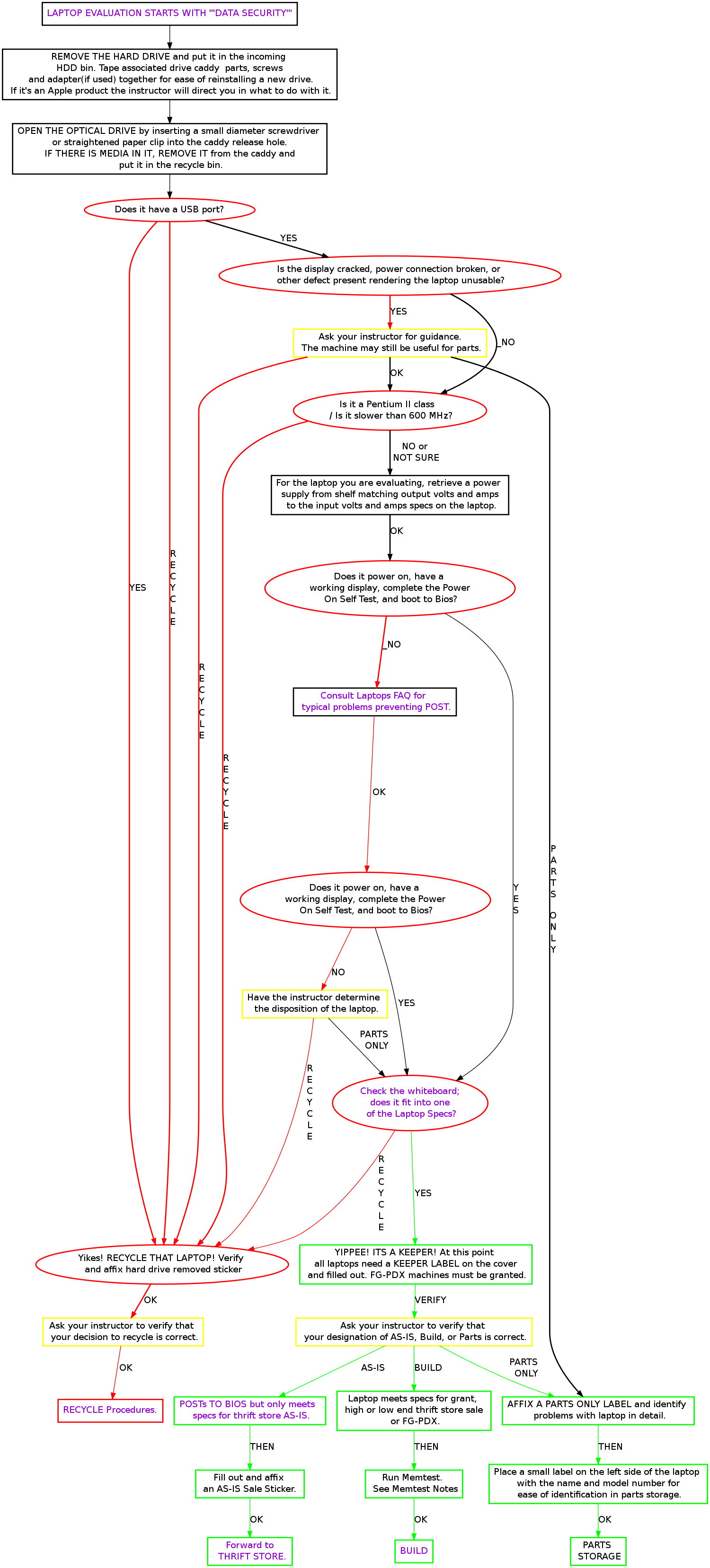
Laptop Evaluation1
From FreekiWiki
Prerequisite: Completing desktop Build.
Laptops are worked on only when a Laptop Build Instructor is available for a Laptop Workshop Class.
Contents |
Goals
- Become comfortable handling laptops
- Learn how to disassemble the different brands of laptops
- Identify internal laptop components
- Get an understanding of where memory, Hard Drive, Modem, and Drives are located
Notes
- The first laptops you take apart will be mostly trashed when you are done
- Start thinking about how you would reassemble the laptop
- Break some down and put them back together
Tools
- You will receive a set of small tools ideal for laptop disassembly including prying hooks, torx & phillips head screwdrivers
Remove the following components
- Screen
- Hard Drive
- Hard Drive Cradle and adapters
- Memory
- Battery
- Wireless Card (internal or PCMCIA)
- PCMCIA Cards
- Modems
- Removable Drives (CD/RW, DVD, Floppy)
Sort these parts for Recycling
Each of these has a corresponding box on the floor or on the table besides the rolling rack
- Screens
- Memory
- CD-ROM & Floppy Drives
- Batteries
- Remaining parts
Save these parts for further evaluation
- Hard Drives
- CD/RW, DVD/RW or CD/RW & DVD-ROM Combo Drives
- Internal Wireless Cards
No adoption
- Unlike desktop systems, laptops are not eligible for adoption by FreeGeek volunteers.