Difference between revisions of "Laptop Evaluation"
Jump to navigation
Jump to search
m (added 'include appropriate memory') |
(updated basic eval chart) |
||
| Line 5: | Line 5: | ||
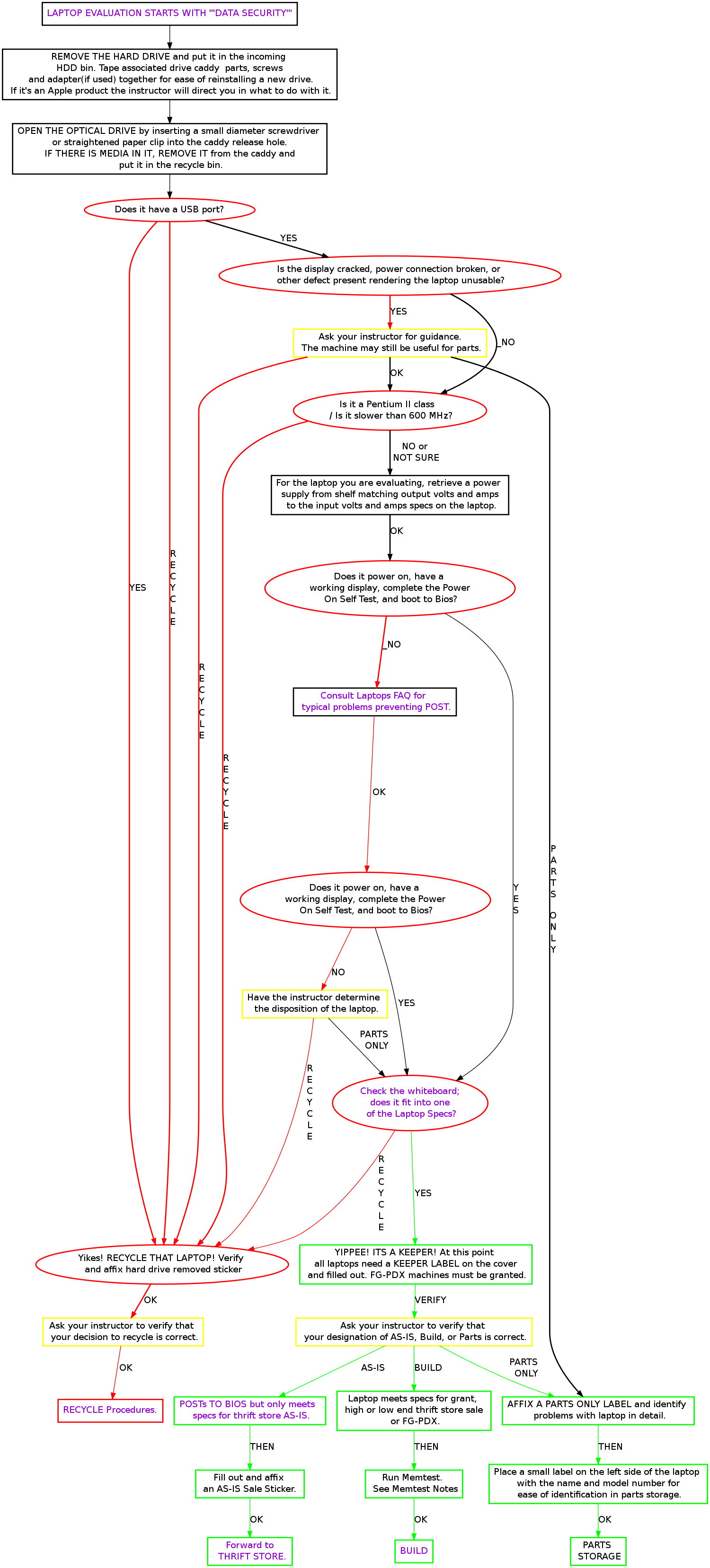
start [label="START HERE", fontsize="11", shape="box", style="bold"] | start [label="START HERE", fontsize="11", shape="box", style="bold"] | ||
| + | hddrem [label="Find and remove hard drive", fontsize="11", shape="box", style="bold"] | ||
| + | busted [label="Is the laptop visibly broken?", fontsize="11"] | ||
| + | ask [label="Ask an instructor what to do with it" fontsize="11", shape="ox", style="bold"] | ||
usb [label="Does it have USB?", fontsize="11"] | usb [label="Does it have USB?", fontsize="11"] | ||
apples [label="Is it an Apple?", fontsize="11"] | apples [label="Is it an Apple?", fontsize="11"] | ||
| − | macpile [label=" | + | macpile [label="Give it to an instructor.\nDo not mine.", fontsize="11", shape="box", style="bold"] |
| − | |||
powerable [label="Does it have RAM\nand a power supply?", fontsize="11"] | powerable [label="Does it have RAM\nand a power supply?", fontsize="11"] | ||
getpower [label="Add RAM or power supply", fontsize="11"] | getpower [label="Add RAM or power supply", fontsize="11"] | ||
poweron [label="Does it power on?\n Does it have a working screen?\n Does it post?", fontsize="11"] | poweron [label="Does it power on?\n Does it have a working screen?\n Does it post?", fontsize="11"] | ||
| − | handwavy [label="Consult | + | handwavy [label="Consult Laptops FAQ on wiki \n Or Ask an Instructor.", fontsize="11", shape="box", style="bold"] |
procclass [label="Can you find\n the Processor Info?\n (try entering BIOS)" fontsize="11"] | procclass [label="Can you find\n the Processor Info?\n (try entering BIOS)" fontsize="11"] | ||
enoughproc [label="Does it fit into one of the specs?", fontsize="11"] | enoughproc [label="Does it fit into one of the specs?", fontsize="11"] | ||
| − | |||
| − | |||
whatzit [label="Run Memtest\n(Don't know how? Ask someone!)" fontsize="11"] | whatzit [label="Run Memtest\n(Don't know how? Ask someone!)" fontsize="11"] | ||
| − | + | keeper [label="Fill out keeper label" fontsize="11", shape="box", style="bold"] | |
| − | + | incoming [label="Recycle That Laptop!",fontsize="11", shape="box", style="bold"] | |
| − | incoming [label=" | ||
| − | start -> usb | + | start -> hddrem |
| + | hddrem -> busted | ||
| + | busted -> ask [label="YES"] | ||
| + | busted -> usb [label="NO"] | ||
usb -> apples [label="YES"] | usb -> apples [label="YES"] | ||
| − | usb -> | + | usb -> incoming [label="NO"] |
apples -> macpile [label="YES"] | apples -> macpile [label="YES"] | ||
| − | apples -> | + | apples -> powerable [label="NO"] |
| − | |||
powerable -> poweron [label="YES"] | powerable -> poweron [label="YES"] | ||
powerable -> getpower [label="NO"] | powerable -> getpower [label="NO"] | ||
| Line 38: | Line 39: | ||
procclass -> whatzit [label="NO"] | procclass -> whatzit [label="NO"] | ||
whatzit -> enoughproc | whatzit -> enoughproc | ||
| − | enoughproc -> | + | enoughproc -> keeper [label="YES"] |
| − | enoughproc -> | + | enoughproc -> incoming [label="NO"] |
| − | + | ||
| − | |||
| − | |||
} | } | ||
</graphviz> | </graphviz> | ||
| − | |||
| − | |||
| − | |||
| − | |||
| − | |||
| − | |||
| − | |||
| − | |||
| − | |||
| − | |||
| − | |||
| − | |||
== Memtest Notes == | == Memtest Notes == | ||
Revision as of 15:00, 29 May 2009
Memtest Notes
Memtest is a useful tool found on many boot disks. Besides testing memory, it provides us a quick way to find processor and memory info. Memtest is available on ebmulti floppies, ubuntu (or other debian based) live cds, and our netboot server.