Difference between revisions of "User talk:Manseau"
Jump to navigation
Jump to search
| Line 15: | Line 15: | ||
hddrem [label="OPEN THE OPTICAL DRIVE by inserting a small diameter screwdriver into \n the caddy release hole. IF THERE IS MEDIA IN IT, REMOVE IT from the caddy \n and put it in the recycle bin.", fontsize="11", shape="box", style="bold", color="black"] | hddrem [label="OPEN THE OPTICAL DRIVE by inserting a small diameter screwdriver into \n the caddy release hole. IF THERE IS MEDIA IN IT, REMOVE IT from the caddy \n and put it in the recycle bin.", fontsize="11", shape="box", style="bold", color="black"] | ||
| − | sort [label=" REMOVE THE HARD DRIVE and put it in the incoming HDD bin. | + | sort [label=" REMOVE THE HARD DRIVE and put it in the incoming HDD bin. Tape associated drive caddy \n parts together for ease of reinstalling new drive. If it's an Apple product the \n instructor will direct you in what to do with it." fontsize="11",shape="box", style="bold", color="black"] |
busted [label="Is the display cracked, power connection broken, or \n other defect present rendering the laptop unusable?", fontsize="11", style="bold", color="red"] | busted [label="Is the display cracked, power connection broken, or \n other defect present rendering the laptop unusable?", fontsize="11", style="bold", color="red"] | ||
Revision as of 15:13, 1 February 2010
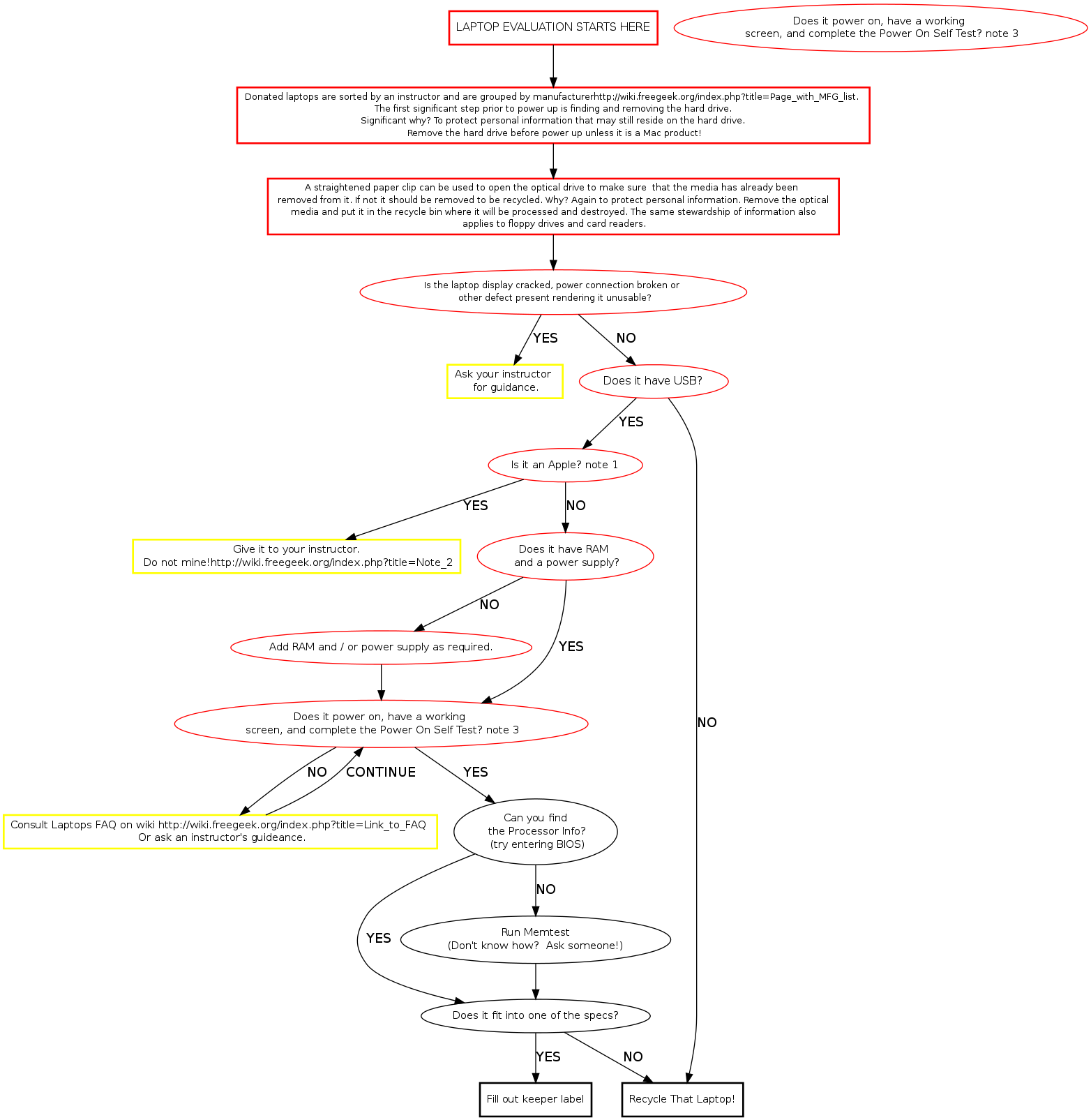
Laptop Evaluation
The laptop evaluation is primarily a rapid, production oriented process. It is designed to quickly separate old or unserviceable technology for recycling from still serviceable laptops and parts. _____________________________________________________________________________________________________________________
Memtest Notes
Memtest is a useful tool found on many boot disks. Besides testing memory, it provides us a quick way to find processor and memory info. Memtest is available on ubuntu (or other debian based) live cds and our netboot server.