Difference between revisions of "Keyboard Testing"
Jump to navigation
Jump to search
| Line 109: | Line 109: | ||
==To test a keyboard, follow these steps== | ==To test a keyboard, follow these steps== | ||
| − | * Turn | + | * Turn the computer on. |
| − | * Connect the keyboard to the system using the extender | + | * Connect the keyboard to the system using the extender on the right, or the USB port in front. |
| − | + | * To test a Macintosh or Apple keyboard, select the "Apple Layout". | |
| − | * | + | * To test standard keyboards, select the standard "104-key Layout". |
| − | * | + | * Select CONTINUE. |
| − | * You will see on the screen what looks like a keyboard. | + | * Go through and test every key. You will see on the screen what looks like a keyboard. When you hit a key on the keyboard, check to see if its image on the screen turns black. This means the key works. If it does not turn black, the key does not work. If any keys do not work then RECYCLE the keyboard. |
| − | * When you have finished going through all the keys, hit the | + | * When you have finished going through all the keys, hit "Reset" to reset the image in the program. |
| − | * | + | *Place working keyboards in the appropriate boxes. When a box gets full, ask a staff member where it goes. |
* Plug in a new keyboard and start all over! | * Plug in a new keyboard and start all over! | ||
| − | |||
| − | |||
| − | |||
==TO RECYCLE A KEYBOARD== | ==TO RECYCLE A KEYBOARD== | ||
Revision as of 15:42, 29 May 2010
TESTING KEYBOARDS
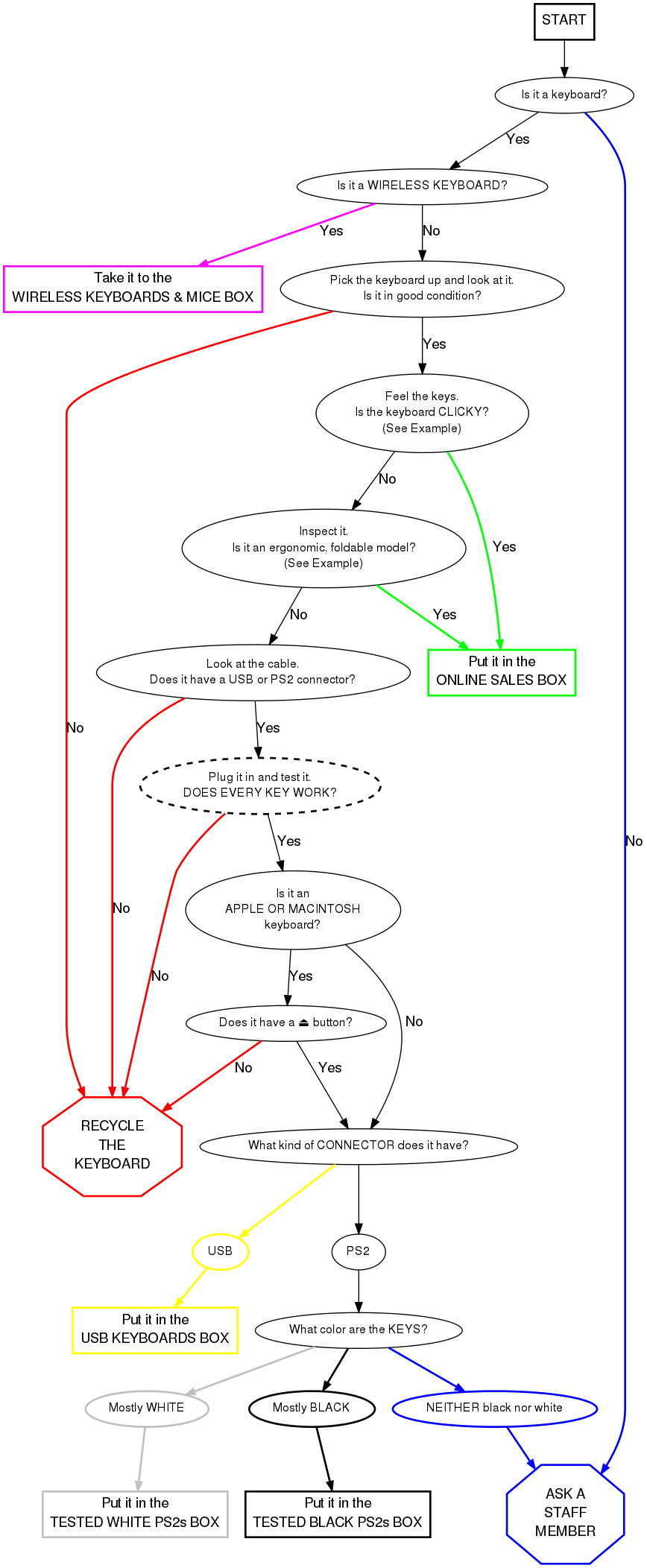
Keyboards are tested for functionality. The good ones are then distributed throughout the building (Build, Thrift Store, etc.) or are boxed up for Bulk Sales. The bad ones are recycled.
Current Project: Updating Keyboard Testing Flowchart
 This is a PS2 keyboard connector.
 This is a USB keyboard connector.
To test a keyboard, follow these steps
- Turn the computer on.
- Connect the keyboard to the system using the extender on the right, or the USB port in front.
- To test a Macintosh or Apple keyboard, select the "Apple Layout".
- To test standard keyboards, select the standard "104-key Layout".
- Select CONTINUE.
- Go through and test every key. You will see on the screen what looks like a keyboard. When you hit a key on the keyboard, check to see if its image on the screen turns black. This means the key works. If it does not turn black, the key does not work. If any keys do not work then RECYCLE the keyboard.
- When you have finished going through all the keys, hit "Reset" to reset the image in the program.
- Place working keyboards in the appropriate boxes. When a box gets full, ask a staff member where it goes.
- Plug in a new keyboard and start all over!
TO RECYCLE A KEYBOARD
- When you have determined that a keyboard does not work, cut off the cord. Put the cord in the metal shopping cart in the main receiving room. Put keyboards in the Gaylord on the sidewalk.
Notes from Free Geek Vancouver
The Finer Points of Keyboard Sorting
An alternate test
If the keyboard tester is flaky or otherwise unavailable, the program "xev" will create a little window for logging x events, including keyboard presses.