Difference between revisions of "Power Supply Triage"
Jump to navigation
Jump to search
(→Test) |
|||
| (45 intermediate revisions by 8 users not shown) | |||
| Line 1: | Line 1: | ||
| + | {{migrated}} | ||
| + | [https://docs.google.com/document/d/1PvNAMB4K7FEjHAu3HOzd-A7-pCWqh_DfNe2OZJvkCuQ/edit?usp=sharing Link] | ||
| + | |||
__NOTOC__ | __NOTOC__ | ||
Power supply sorting is done in [[System Evaluation]]. | Power supply sorting is done in [[System Evaluation]]. | ||
| − | == | + | == Triage Chart == |
| − | |||
| − | |||
| − | |||
| − | |||
| − | |||
| − | |||
| − | |||
| − | |||
<graphviz> | <graphviz> | ||
| Line 18: | Line 13: | ||
edge [fontname="Helvetica"] | edge [fontname="Helvetica"] | ||
| − | |||
start [label="START HERE", shape="box", style="bold"] | start [label="START HERE", shape="box", style="bold"] | ||
| − | + | type [label="What type is it?\nATX,\nHot Swappable,\nor Other?"] | |
| + | twentyfourpin [label="Is it 24 PIN capable?\n(test all 24 pin-see note below)"] | ||
| + | sata [label="Does it have a\nSATA power connector?"] | ||
shape [label="Is it the same shape and size\n as the power supply marked 'EXAMPLE'?\nLittle metal rails don't count as different;\nexternal fans do."] | shape [label="Is it the same shape and size\n as the power supply marked 'EXAMPLE'?\nLittle metal rails don't count as different;\nexternal fans do."] | ||
| − | + | highpower [label="Does it say '350W' or greater on its label?"] | |
| − | broken [label="Is it broken?\nDoes it have clipped cords or an open case?\nDid somebody write 'BAD' on it? | + | dell [label="Does it say 'DELL' on its label?"] |
| − | + | gooddell [label="Does it have\na GREEN WIRE?"] | |
| + | broken [label="Is it broken?\nDoes it have clipped cords or an open case?\nDid somebody write 'BAD' on it?\nAre there scorched connectors?"] | ||
test [label="TEST IT\nDoes it work?"] | test [label="TEST IT\nDoes it work?"] | ||
| − | keep [label="KEEP\ | + | keep [label="KEEP" shape="box", style="bold"] |
| + | recycle [label="RECYCLE" shape="box", style="bold"] | ||
| + | servers [label="Take to\nSERVER LAND" shape="box", style="bold"] | ||
| + | ask [label="ASK\nwhere it goes" shape="box", style="bold"] | ||
| + | |||
| + | start -> type | ||
| + | type -> twentyfourpin [label="ATX"] | ||
| + | type -> servers [label="Hot\nSwappable"] | ||
| + | type -> ask [label="Others"] | ||
| − | + | twentyfourpin -> sata [taillabel="NO"] | |
| − | + | twentyfourpin -> test [label="YES"] | |
| − | + | ||
| − | + | sata -> highpower [taillabel="NO"] | |
| − | + | sata -> test [label="YES"] | |
| + | |||
| + | highpower -> recycle [taillabel="NO"] | ||
| + | highpower -> shape [label="YES"] | ||
shape -> broken [label="YES"] | shape -> broken [label="YES"] | ||
| Line 38: | Line 46: | ||
broken -> recycle [taillabel="YES"] | broken -> recycle [taillabel="YES"] | ||
| − | broken -> | + | broken -> dell [label="NO"] |
| + | |||
| + | dell -> test [label="NO"] | ||
| + | dell -> gooddell [label="YES"] | ||
| + | |||
| + | gooddell -> test [label="YES"] | ||
| + | gooddell -> recycle [label="NO"] | ||
| − | |||
| − | |||
test -> recycle [label="NO"] | test -> recycle [label="NO"] | ||
test -> keep [label="YES"] | test -> keep [label="YES"] | ||
| Line 48: | Line 60: | ||
== Testing Power Supplies == | == Testing Power Supplies == | ||
| − | Use a standard ATX power supply tester for a 20 pin ATX power supply | + | Use a standard ATX power supply tester for a 20 pin ATX power supply. |
For each power supply that needs to be tested, do these things: | For each power supply that needs to be tested, do these things: | ||
# Plug each power supply into outlet | # Plug each power supply into outlet | ||
| + | # If there is a rear power supply switch, make sure it is turned on. | ||
# Connect the tester to the 20 pin ATX connector | # Connect the tester to the 20 pin ATX connector | ||
#* Check lights (all lights on is good, but it is also OK if the -5V light is off) | #* Check lights (all lights on is good, but it is also OK if the -5V light is off) | ||
# Connect the tester to the 4 pin ATX connector | # Connect the tester to the 4 pin ATX connector | ||
| − | #* Check | + | #* Check to see if the +12V light is on |
| − | |||
== What to do when done, where to put them == | == What to do when done, where to put them == | ||
| − | |||
; Keepers | ; Keepers | ||
| − | : Mark them ''' | + | : Mark them '''OK''' in a corner on the side where the wires come out with a sharpie. |
| − | : | + | :* Use small letters. These are likely going to be sold and customers don't want them all marked up. |
| + | : Put them on the POWER SUPPLIES TO KEEP shelf | ||
; Recycle | ; Recycle | ||
| + | : Mark them '''LARGE frowny face''' somewhere with a sharpie. Go ahead and be creative if you want. | ||
: Take them to the warehouse and put them in the POWER SUPPLIES TO RECYCLE location | : Take them to the warehouse and put them in the POWER SUPPLIES TO RECYCLE location | ||
| − | [[Category: | + | [[Category: System Evaluation]] |
Latest revision as of 11:13, 15 August 2014
 This page has been migrated to a document on Free Geek's Google Drive. Information remaining behind may no longer be relevant. MIGRATOR: When you have tagged this page as migrated, (Link to new page immediately below.) |
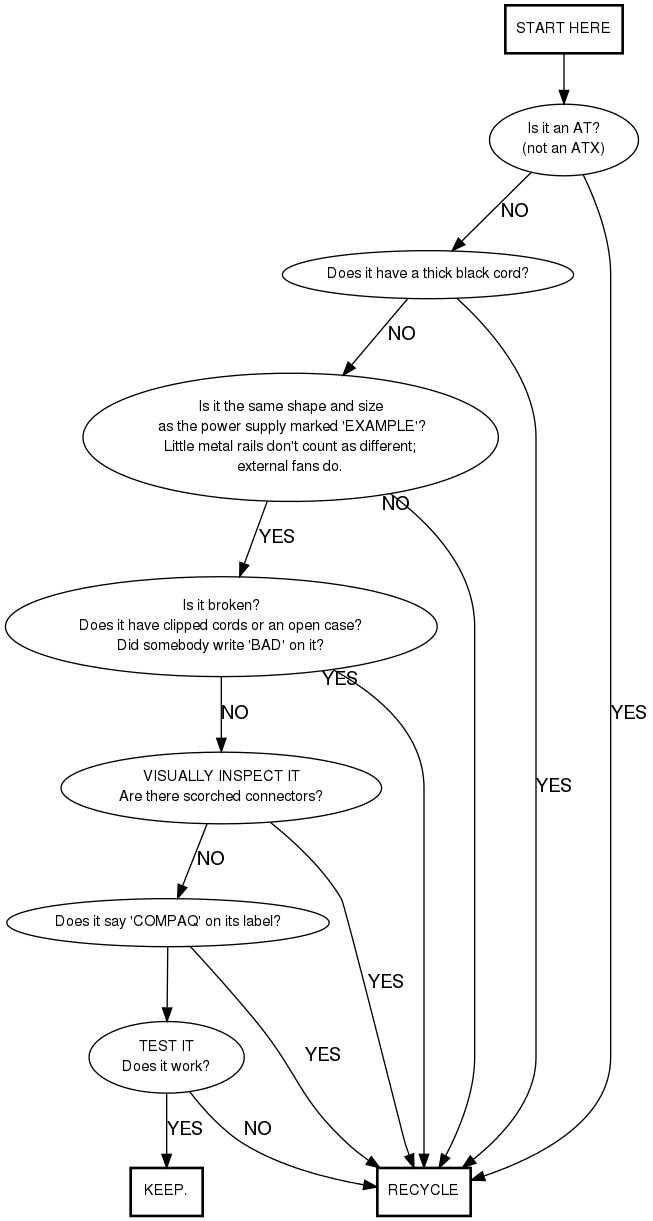
Power supply sorting is done in System Evaluation.
Triage Chart
Testing Power Supplies
Use a standard ATX power supply tester for a 20 pin ATX power supply.
For each power supply that needs to be tested, do these things:
- Plug each power supply into outlet
- If there is a rear power supply switch, make sure it is turned on.
- Connect the tester to the 20 pin ATX connector
- Check lights (all lights on is good, but it is also OK if the -5V light is off)
- Connect the tester to the 4 pin ATX connector
- Check to see if the +12V light is on
What to do when done, where to put them
- Keepers
- Mark them OK in a corner on the side where the wires come out with a sharpie.
- Use small letters. These are likely going to be sold and customers don't want them all marked up.
- Put them on the POWER SUPPLIES TO KEEP shelf
- Recycle
- Mark them LARGE frowny face somewhere with a sharpie. Go ahead and be creative if you want.
- Take them to the warehouse and put them in the POWER SUPPLIES TO RECYCLE location