Difference between revisions of "ATK Motherboard Testing Procedures"
Jump to navigation
Jump to search
| (22 intermediate revisions by one other user not shown) | |||
| Line 1: | Line 1: | ||
| + | {{Delete}} | ||
| + | |||
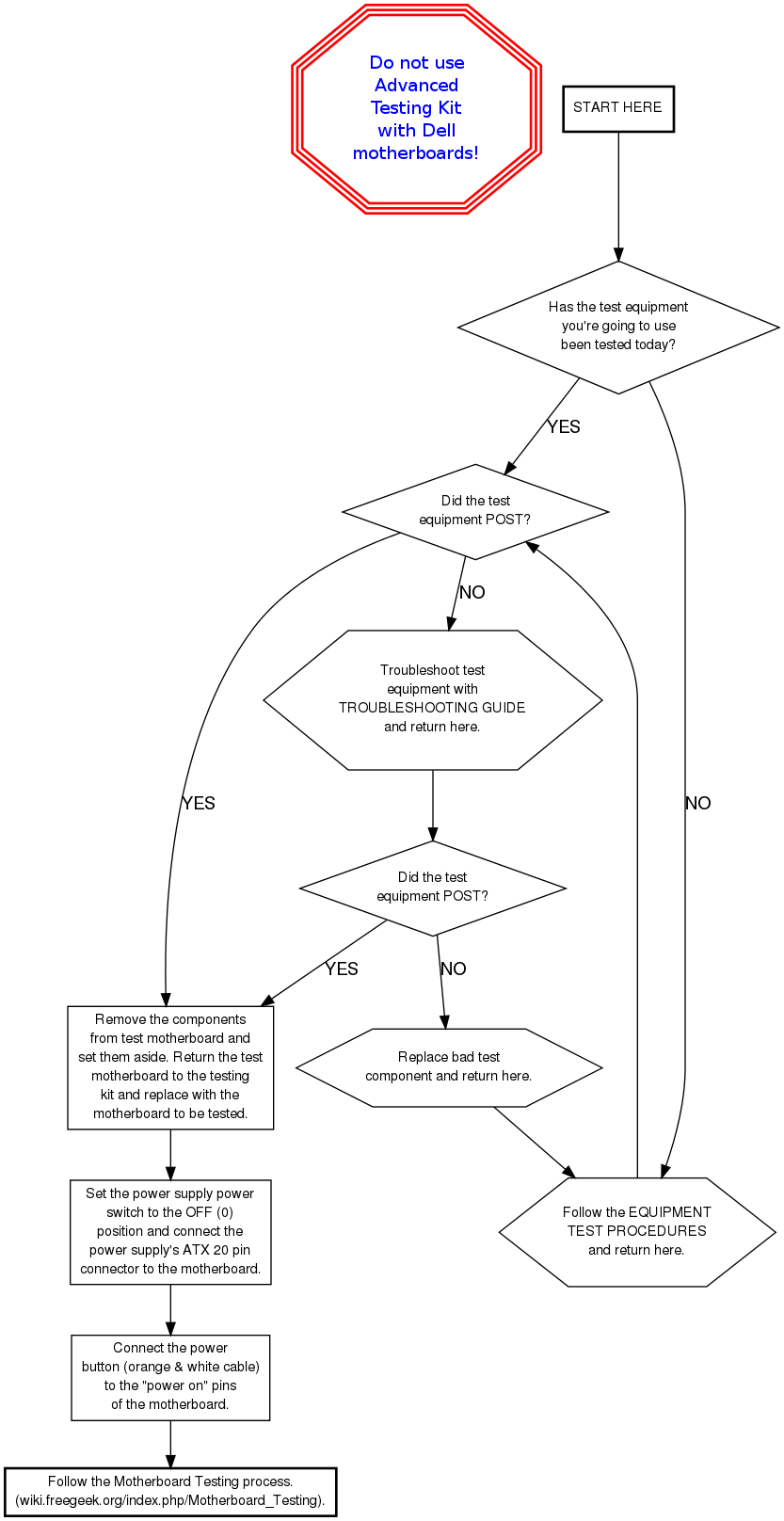
<graphviz> | <graphviz> | ||
| − | digraph | + | digraph { |
node [fontname="Helvetica", fontsize="11"] | node [fontname="Helvetica", fontsize="11"] | ||
edge [fontname="Helvetica"] | edge [fontname="Helvetica"] | ||
| + | |||
| + | dell [label="Do not use\nAdvanced\nTesting Kit\nwith Dell\nmotherboards!", fontsize="14", fontcolor="blue", fontname="helveticabold", style="bold", shape="tripleoctagon", color="red"] | ||
start [label="START HERE", shape="box", style="bold"] | start [label="START HERE", shape="box", style="bold"] | ||
| − | tested [label="Has the test equipment\nyou're going to use\nbeen tested?", shape="diamond"] | + | tested [label="Has the test equipment\nyou're going to use\nbeen tested today?", shape="diamond"] |
epost [label="Did the test\nequipment POST?", shape="diamond"] | epost [label="Did the test\nequipment POST?", shape="diamond"] | ||
epost2 [label="Did the test\nequipment POST?", shape="diamond"] | epost2 [label="Did the test\nequipment POST?", shape="diamond"] | ||
| Line 12: | Line 16: | ||
trouble [label="Troubleshoot test\nequipment with\nTROUBLESHOOTING GUIDE\nand return here.", shape="hexagon"] | trouble [label="Troubleshoot test\nequipment with\nTROUBLESHOOTING GUIDE\nand return here.", shape="hexagon"] | ||
badtest [label="Replace bad test\ncomponent and return here.", shape="hexagon"] | badtest [label="Replace bad test\ncomponent and return here.", shape="hexagon"] | ||
| − | remove [label="Remove the components\nfrom test\ | + | remove [label="Remove the components\nfrom test motherboard and\nset them aside. Return the test\nmotherboard to the testing\nkit and replace with the\nmotherboard to be tested.", shape="box"] |
| − | button [label="Connect the power\nbutton (orange & white cable\nto the "power on"pins | + | power [label="Set the power supply power\nswitch to the OFF (0)\nposition and connect the\npower supply's ATX 20 pin\nconnector to the motherboard.", shape="box"] |
| − | + | button [label="Connect the power\nbutton (orange & white cable)\nto the \"power on\" pins\nof the motherboard.", shape="box"] | |
| − | + | process [label="Follow the Motherboard Testing process.\n(wiki.freegeek.org/index.php/Motherboard_Testing).", shape="box", style="bold"] | |
| − | + | ||
| − | + | ||
| − | + | start -> tested | |
| − | + | ||
| + | tested -> epost [label="YES"] | ||
| + | tested -> equiptest [label="NO"] | ||
| + | |||
| + | equiptest -> epost | ||
| + | |||
| + | epost -> remove [label="YES"] | ||
| + | epost -> trouble [label="NO"] | ||
| + | |||
| + | trouble -> epost2 | ||
| + | |||
| + | |||
| + | epost2 -> remove [label="YES"] | ||
| + | epost2 -> badtest [label="NO"] | ||
| + | |||
| + | badtest -> equiptest | ||
| + | |||
| + | remove -> power | ||
| + | |||
| + | power -> button | ||
| + | |||
| + | button -> process | ||
| + | } | ||
| + | </graphviz> | ||
| + | |||
| + | [[Category:Advanced Testing Kit]] | ||
Latest revision as of 13:51, 10 May 2013
 This page has been requested to be deleted. |