Difference between revisions of "Hardware Identification Overview"
Jump to navigation
Jump to search
| (4 intermediate revisions by one other user not shown) | |||
| Line 1: | Line 1: | ||
| + | {{cleanup}} | ||
| + | |||
__NOTOC__ | __NOTOC__ | ||
| − | At the end of each instruction sheet and its hands-on exercises, put all the items back into the Lesson Box with the same letter. | + | Get each Lesson Box in sequence, find the instruction sheets and read them. Then do the exercise(s) until you feel comfortable with the objective of the lesson. At the end of each instruction sheet and its hands-on exercises, put all the items back into the Lesson Box with the same letter. |
| + | |||
<graphviz> | <graphviz> | ||
digraph D { | digraph D { | ||
| Line 15: | Line 18: | ||
box_e [label="Get Box E", shape="box", style="bold"] | box_e [label="Get Box E", shape="box", style="bold"] | ||
box_f [label="Get Box F", shape="box", style="bold"] | box_f [label="Get Box F", shape="box", style="bold"] | ||
| + | |||
cards_vs_memory [label="Read All About Cards\nand Cards vs. Memory"] | cards_vs_memory [label="Read All About Cards\nand Cards vs. Memory"] | ||
| Line 22: | Line 26: | ||
read_and_do [label="Read All About Memory\nand do exercise"] | read_and_do [label="Read All About Memory\nand do exercise"] | ||
got_it [label="Have you got it?"] | got_it [label="Have you got it?"] | ||
| − | got_it2 [label=" | + | got_it2 [label="Got it?"] |
| + | real_cards [label="Get cards from instructor\nand sort them"] | ||
| + | motherboard_sorting [label="Find the items shown in\nInstructions and SORT MOBOs | ||
start -> box_a | start -> box_a | ||
box_a -> read_and_do | box_a -> read_and_do | ||
read_and_do -> got_it | read_and_do -> got_it | ||
| − | |||
got_it -> cards_vs_memory [label="Yes"] | got_it -> cards_vs_memory [label="Yes"] | ||
| − | got_it -> memory_sorting | + | got_it -> memory_sorting [label="No"] |
memory_sorting -> cards_vs_memory | memory_sorting -> cards_vs_memory | ||
| + | |||
cards_vs_memory -> card_function_sort | cards_vs_memory -> card_function_sort | ||
| + | card_function_sort -> got_it2 | ||
| + | got_it2 -> box_b [label="Yes"] | ||
| + | got_it2 -> real_cards [label="No"] | ||
| + | real_cards -> box_b | ||
| + | box_b -> card_slot_identification | ||
| + | card_slot_identification -> box_c | ||
| − | |||
| − | |||
| − | |||
| − | |||
box_c -> motherboard_sorting | box_c -> motherboard_sorting | ||
motherboard_sorting -> box_d | motherboard_sorting -> box_d | ||
Latest revision as of 13:43, 17 May 2013
This page or section appears to be out of date or otherwise inaccurate.
Please edit as seems necessary, removing the {{cleanup}} tag when you are through.
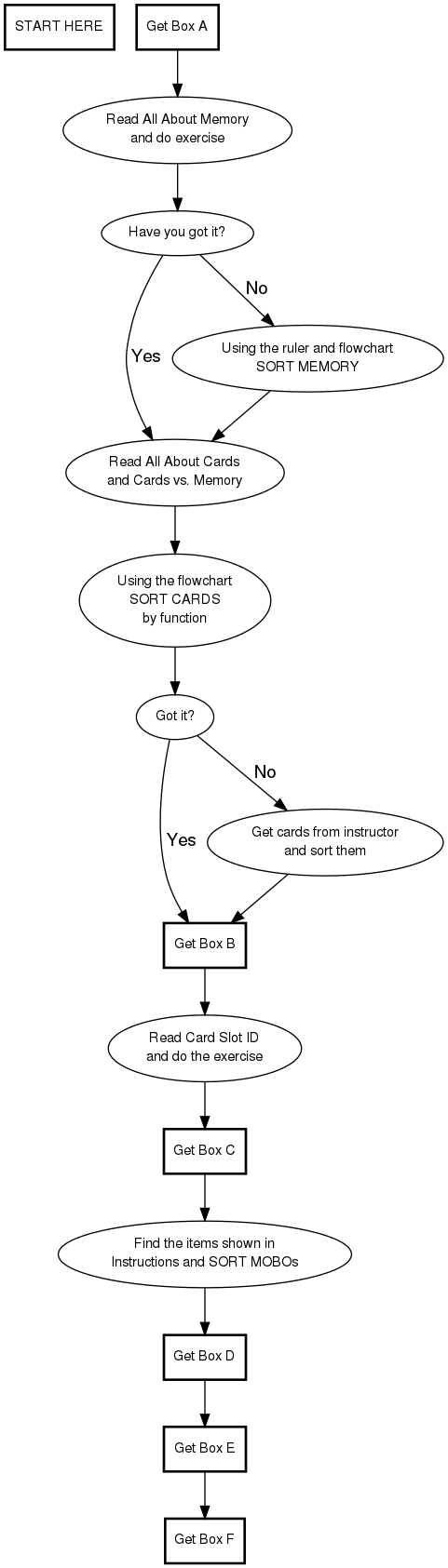
Get each Lesson Box in sequence, find the instruction sheets and read them. Then do the exercise(s) until you feel comfortable with the objective of the lesson. At the end of each instruction sheet and its hands-on exercises, put all the items back into the Lesson Box with the same letter.