Difference between revisions of "User talk:Manseau"
Jump to navigation
Jump to search
| Line 4: | Line 4: | ||
# size="10,12" | # size="10,12" | ||
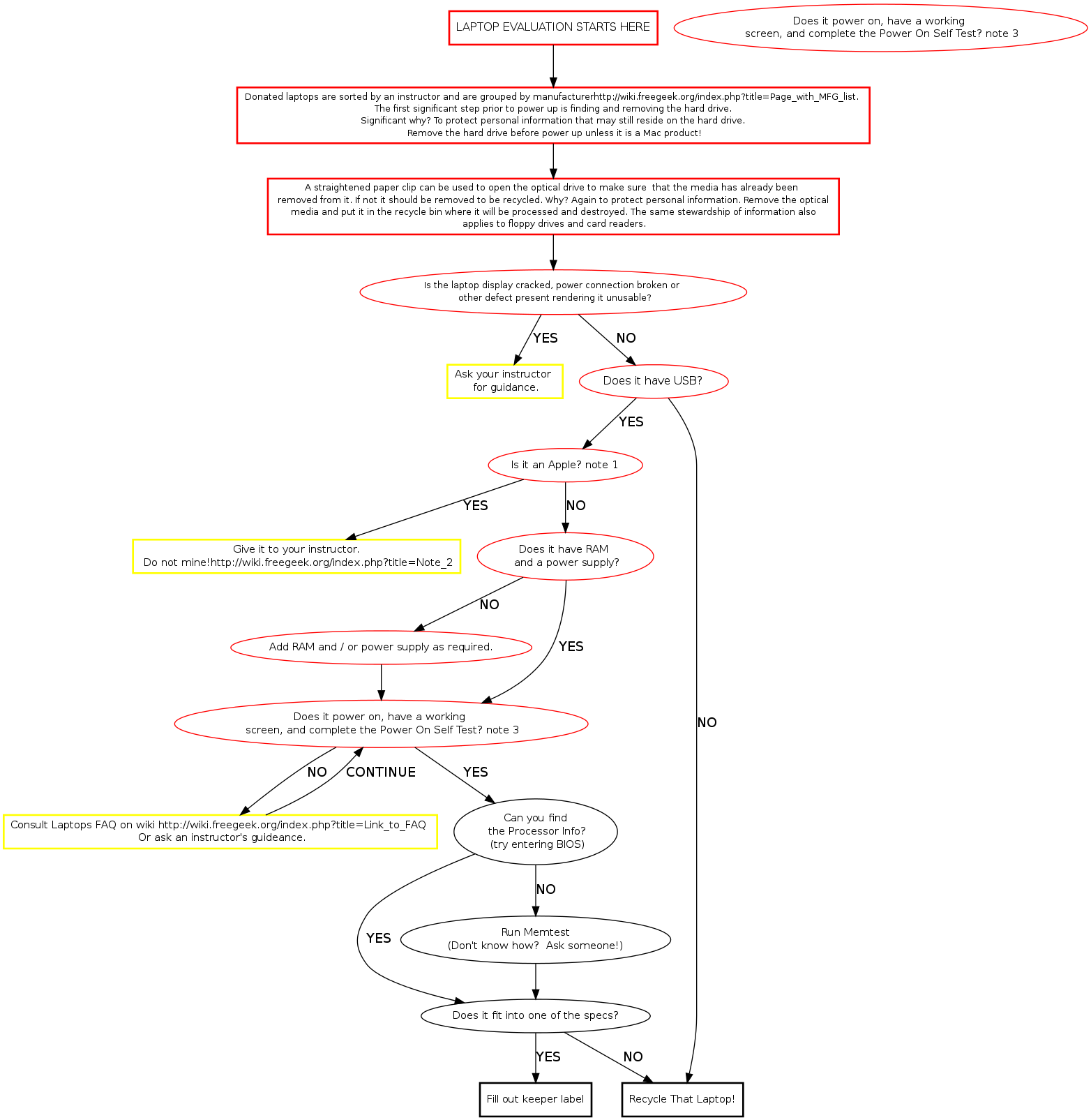
start [label="LAPTOP BUILD STARTS HERE", fontsize="12", shape="box", style="bold", | start [label="LAPTOP BUILD STARTS HERE", fontsize="12", shape="box", style="bold", | ||
| − | color=" | + | color="red"] |
| − | sort [label="Donated laptops are sorted by an instructor and are grouped by manufacturer[[Page with MFG list]]. \n The first significant step prior to power up is finding and removing the hard drive. \n Significant why? To protect personal information that may still reside on the hard drive. \n Remove the hard drive before power up unless it is a Mac product!", fontsize="10",shape="box", style="bold"] | + | sort [label="Donated laptops are sorted by an instructor and are grouped by manufacturer[[Page with MFG list]]. \n The first significant step prior to power up is finding and removing the hard drive. \n Significant why? To protect personal information that may still reside on the hard drive. \n Remove the hard drive before power up unless it is a Mac product!", fontsize="10",shape="box", style="bold", color="red"] |
| − | hddrem [label="A straightened paper clip can be used to open the optical drive to make sure that the media has already been \n removed from it. If not it should be removed to be recycled. Why? Again to protect personal information. Remove the optical \n media and put it in the recycle bin where it will be processed and destroyed. The same stewardship of information also \n applies to floppy drives and card readers.", fontsize="10", shape="box", style="bold"] | + | hddrem [label="A straightened paper clip can be used to open the optical drive to make sure that the media has already been \n removed from it. If not it should be removed to be recycled. Why? Again to protect personal information. Remove the optical \n media and put it in the recycle bin where it will be processed and destroyed. The same stewardship of information also \n applies to floppy drives and card readers.", fontsize="10", shape="box", style="bold", color="red"] |
| − | busted [label="Is the laptop display cracked, power connection broken or \n other defect present rendering it unusable?", fontsize="10"] | + | busted [label="Is the laptop display cracked, power connection broken or \n other defect present rendering it unusable?", fontsize="10", color="red"] |
| − | ask [label="Ask your instructor \n for guidance." fontsize="11", shape="ox", | + | ask [label="Ask your instructor \n for guidance." fontsize="11", shape="ox", style="bold", color="red"] |
| − | + | ||
| − | usb [label="Does it have USB?", fontsize="12"] | + | usb [label="Does it have USB?", fontsize="12", color="red"] |
| − | apples [label="Is it an Apple?", fontsize="11"] | + | apples [label="Is it an Apple?", fontsize="11", color="red"] |
macpile [label="Give it to an instructor.\nDo not mine.", fontsize="11", shape="box", style="bold"] | macpile [label="Give it to an instructor.\nDo not mine.", fontsize="11", shape="box", style="bold"] | ||
powerable [label="Does it have RAM\nand a power supply?", fontsize="11"] | powerable [label="Does it have RAM\nand a power supply?", fontsize="11"] | ||
Revision as of 14:22, 16 January 2010
Memtest Notes
Memtest is a useful tool found on many boot disks. Besides testing memory, it provides us a quick way to find processor and memory info. Memtest is available on ebmulti floppies, ubuntu (or other debian based) live cds, and our netboot server.