Difference between revisions of "User talk:Manseau"
Jump to navigation
Jump to search
| Line 12: | Line 12: | ||
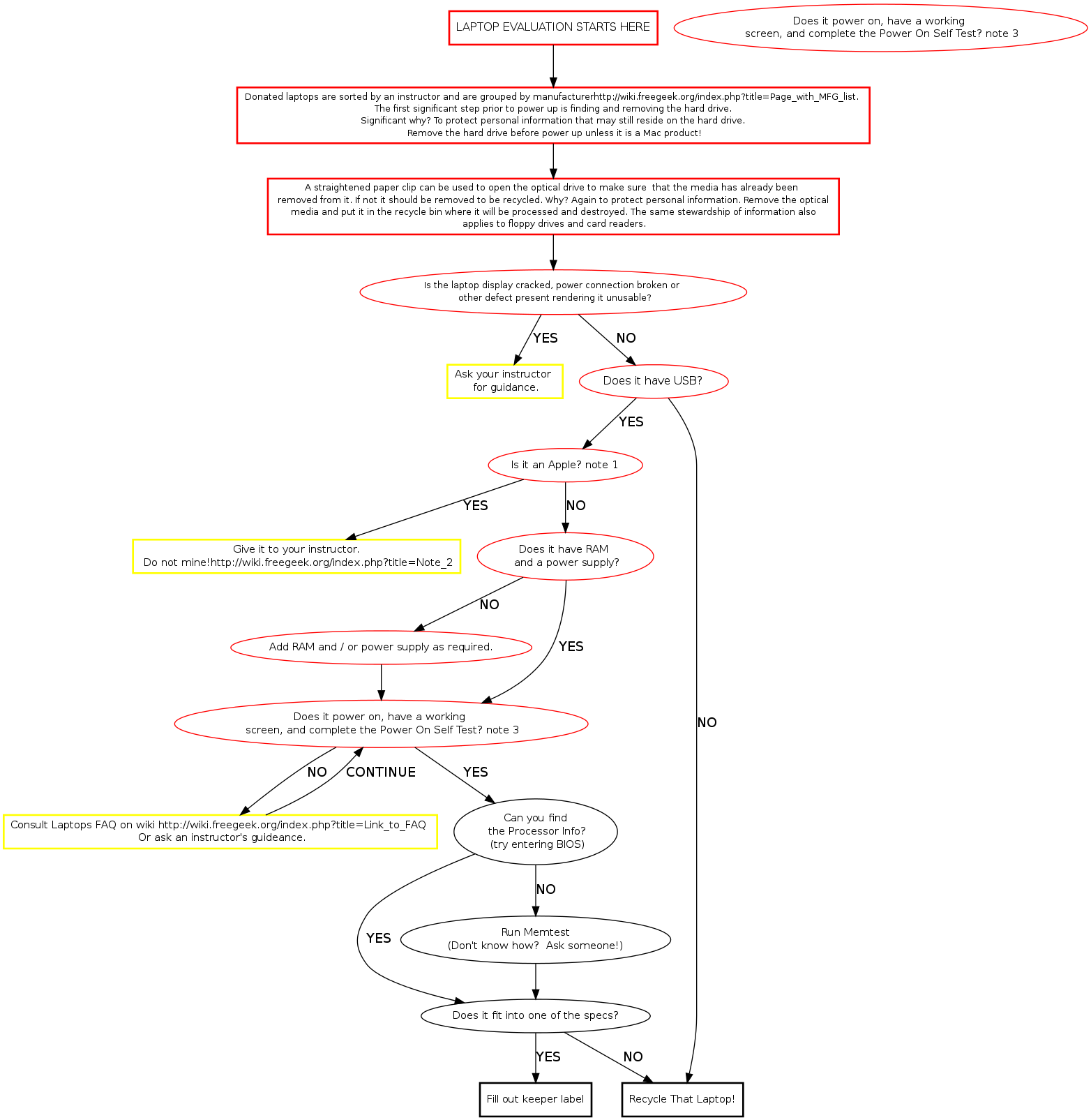
hddrem [label="OPEN THE OPTICAL DRIVE by inserting a small diameter screwdriver into \n the caddy release hole. IF THERE IS MEDIA IN IT, REMOVE IT from the caddy \n and put it in the recycle bin.", fontsize="11", shape="box", style="bold", color="black"] | hddrem [label="OPEN THE OPTICAL DRIVE by inserting a small diameter screwdriver into \n the caddy release hole. IF THERE IS MEDIA IN IT, REMOVE IT from the caddy \n and put it in the recycle bin.", fontsize="11", shape="box", style="bold", color="black"] | ||
| − | sort [label=" | + | sort [label=" REMOVE THE HARD DRIVE and put it in the incoming HDD bin.If it's an Apple product the \n instructor will direct you in what to do with it.[[Data Protection Policy]]" fontsize="11",shape="box", style="bold", color="black"] |
busted [label="Is the display cracked, power connection broken or \n other defect present rendering the laptop unusable?", fontsize="11", style="bold", color="red"] | busted [label="Is the display cracked, power connection broken or \n other defect present rendering the laptop unusable?", fontsize="11", style="bold", color="red"] | ||
| Line 28: | Line 28: | ||
procclass [label="Can you find\n the Processor Info?\n Try booting to BIOS." fontsize="11", style="bold", color="red"] | procclass [label="Can you find\n the Processor Info?\n Try booting to BIOS." fontsize="11", style="bold", color="red"] | ||
| − | keeper [label="Consult Laptops | + | keeper [label="Consult Laptops [[FAQ]] on WIKI." fontsize="11", shape="box", style="bold", color="yellow"] |
defect [label="Research specs consistent with \n the MFG and model number." fontsize="12", shape="box", style="bold", | defect [label="Research specs consistent with \n the MFG and model number." fontsize="12", shape="box", style="bold", | ||
| Line 39: | Line 39: | ||
whatzit [label="[[Run Memtest]]\n(Don't know how? Ask someone!)" fontsize="11", shape="box", style="bold", color="red"] | whatzit [label="[[Run Memtest]]\n(Don't know how? Ask someone!)" fontsize="11", shape="box", style="bold", color="red"] | ||
| − | keeper [label="YIPPEE! | + | keeper [label="YIPPEE! ITS A KEEPER!" fontsize="11", shape="box", style="bold", color="green"] |
pieces [label="Machine won't boot but fits \n other build specs, instructor will \n determine if it recycles or becomes \n a parts machine.",fontsize="11", shape="box", style="bold", color="yellow"] | pieces [label="Machine won't boot but fits \n other build specs, instructor will \n determine if it recycles or becomes \n a parts machine.",fontsize="11", shape="box", style="bold", color="yellow"] | ||
Revision as of 13:52, 23 January 2010
Memtest Notes
Memtest is a useful tool found on many boot disks. Besides testing memory, it provides us a quick way to find processor and memory info. Memtest is available on ebmulti floppies, ubuntu (or other debian based) live cds, and our netboot server.