Difference between revisions of "User talk:Manseau"
Jump to navigation
Jump to search
| Line 51: | Line 51: | ||
tstore [label=" Verify hard drive removed and \n [[As Is]] sale sticker. \n Forward to thrift store." fontsize="11", shape="box", style="bold", color=""] | tstore [label=" Verify hard drive removed and \n [[As Is]] sale sticker. \n Forward to thrift store." fontsize="11", shape="box", style="bold", color=""] | ||
| − | parts [label="AFFIX A PARTS ONLY LABEL and identify problems \n in detail with laptop. \n AFFIX A KEEPER LABEL | + | parts [label="AFFIX A PARTS ONLY LABEL and identify problems \n in detail with laptop. \n AFFIX A KEEPER LABEL on it if one does not exist.",fontsize="11", shape="box", style="bold", color="green"] |
rcycle [label="[[RECYCLE]]procedures.",fontsize="11", shape="box", style="bold", color="green"] | rcycle [label="[[RECYCLE]]procedures.",fontsize="11", shape="box", style="bold", color="green"] | ||
| − | prts [label="",fontsize="11", shape="box", style="bold", color="green"] | + | prts [label="Place a small label on the left side of the laptop \n with the name and model number wor \n ease of identification in storage.",fontsize="11", shape="box", style="bold", color="green"] |
[label="",fontsize="11", shape="box", style="bold", color="green"] | [label="",fontsize="11", shape="box", style="bold", color="green"] | ||
Revision as of 14:11, 23 January 2010
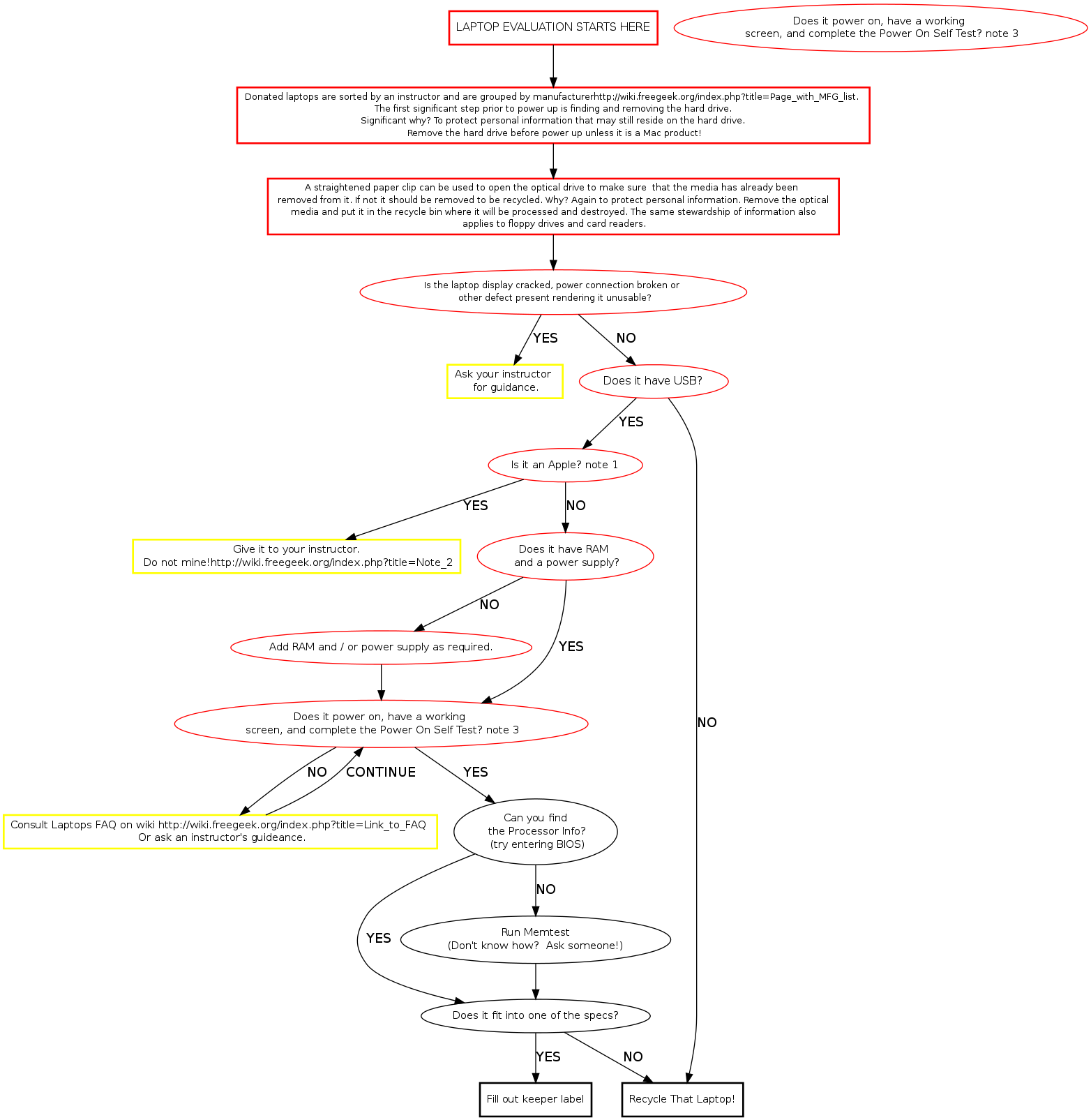
Memtest Notes
Memtest is a useful tool found on many boot disks. Besides testing memory, it provides us a quick way to find processor and memory info. Memtest is available on ebmulti floppies, ubuntu (or other debian based) live cds, and our netboot server.