Difference between revisions of "MacBuild CED Eval"
Jump to navigation
Jump to search
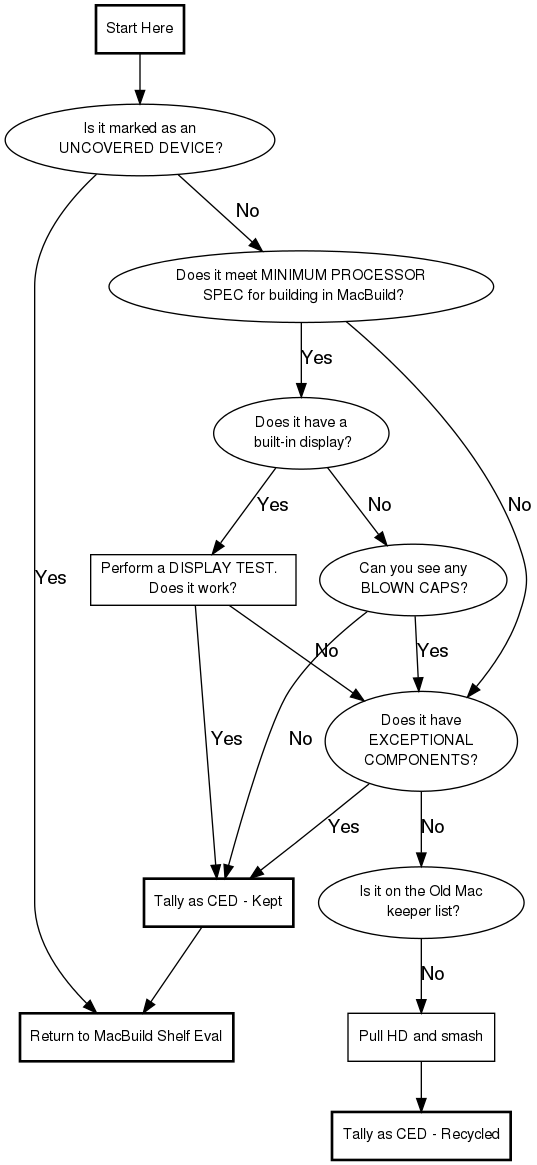
| Line 34: | Line 34: | ||
noboot [label="Did the system power on?"] | noboot [label="Did the system power on?"] | ||
yespower [label="Use the tag on the system\n to get the info for\n the KEEPER label" shape=box] | yespower [label="Use the tag on the system\n to get the info for\n the KEEPER label" shape=box] | ||
| − | nopower [label="Use the tag on the system\n to get the info for the\n KEEPER label, and | + | nopower [label="Use the tag on the system\n to get the info for the\n KEEPER label, and write\n 'Did not POST' on the Notes section of\n the KEEPER label." shape=box] |
start -> computer | start -> computer | ||
Revision as of 17:30, 28 October 2009
CED Eval
Exceptional Components List
- DDR memory
- Stick of 256 MB or better SDRAM
- 30 GB or bigger hard drive
- Airport or Airport Extreme card
- Combo DVD/DVD-R/DVD/RW and CD-R/RW drive
Special Case List
eMac
Certain ranges of eMacs were manufactured with faulty capacitors, leading to very common instances of hardware failure. Check the eMac's serial number (located inside the optical drive bay door). If an eMac's serial number falls within the following ranges, it means it has bad capacitors and should be recycled regardless of working state:
- G8412xxxxxx - G8520xxxxxx
- YM412xxxxxx - YM520xxxxxx
- VM414xxxxxx - VM518xxxxxx
iMac G5 (no ALS or iSight)
As with eMacs, certain ranges of the first-generation iMac G5s (specifically 17" and 20" models with 1.6 GHz and 1.8 GHz processors) were manufactured with faulty capacitors. Check under the iMac G5's "foot" for the serial number. If an iMac's serial number falls within the following ranges, it means it has bad capacitors and should be set aside for repair:
- W8435xxxxxx - W8522xxxxxx
- QP435xxxxxx - QP522xxxxxx
- CK435xxxxxx - CK522xxxxxx
- YD435xxxxxx - YD522xxxxxx