Legacy Evaluation Overview
Jump to navigation
Jump to search
The printable version is no longer supported and may have rendering errors. Please update your browser bookmarks and please use the default browser print function instead.
JOBS List
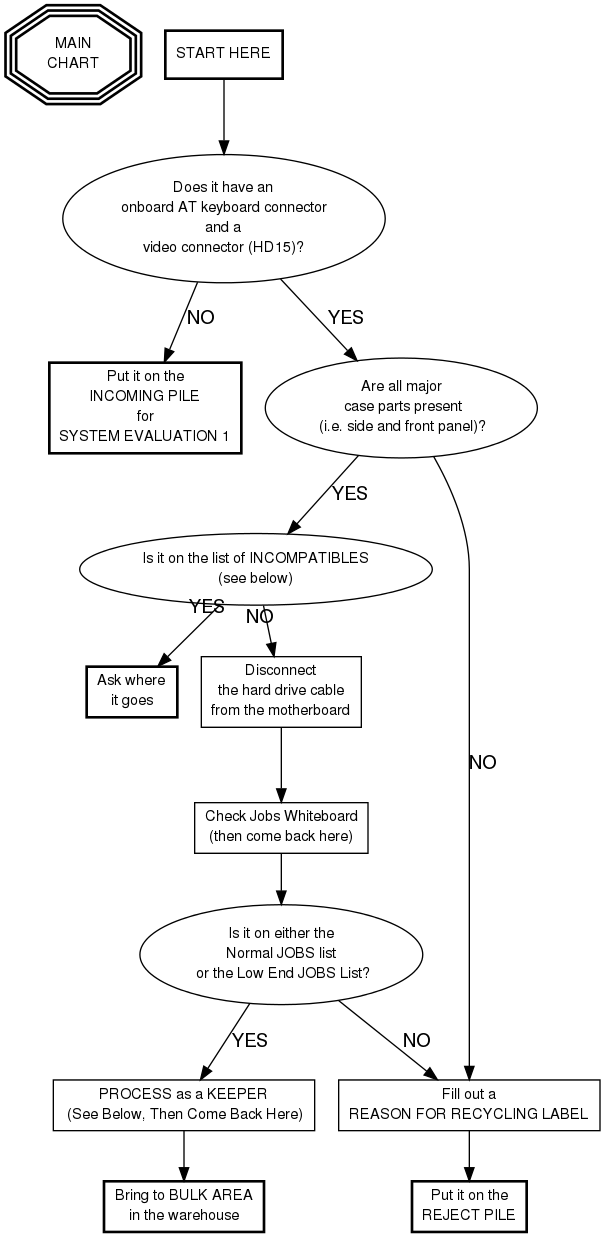
Systems listed on the JOBS LIST WHITE BOARD are keepers. The others will be recycled.
(What qualifies as a keeper changes frequently, so check the JOBS LIST WHITE BOARD to see what the rules are today.)
Processing KEEPERS
- What kind of job is it?
- If it's a low end job (not a normal job -- see above), remove hard drive
- Power up the system and ensure it POSTs. (It will likely fail to boot since there's no hard drive.)
- If it's a normal job (not a low end job -- see above), replace hard drive(s) with a single, pre-wiped 6-8 gig drive
- pre-wiped 6-8 gig drives can be gotten from a build instructor from the TARDIS
- Power up the system and ensure it recognizes the hard drive during startup
- If it's a low end job (not a normal job -- see above), remove hard drive
- Quickly place pulled hard drives into storage
- Storage for pulled hard drives is located between System Eval 1 and System Eval 2
- Things to remove from keeper systems:
- All non-proprietary cards (AGP, PCI, ISA, etc) except the video card
- All loose cables
- All CD-RW and DVD drives
- Fill out a KEEPER LABEL processor type and speed (i.e. "K6/2 300" or "486 33", etc.)
- (See instructions in Eval 2 for details.)
Incompatibles
- Amiga
- Apple, etc:
- Mac
- Radius
- PowerPC
- PowerComputing
- Commodore
- DEC (Digital Equipment Corporation)
- Sun
- Silicon Graphics (SGI)
- Indy (they're blue)