Difference between revisions of "Printer Build 1"
Jump to navigation
Jump to search
| (5 intermediate revisions by one other user not shown) | |||
| Line 4: | Line 4: | ||
-------------------- | -------------------- | ||
| − | + | <graphviz> | |
| − | + | digraph{ | |
| − | + | ||
| − | + | node [fontname="Helvetica", fontsize="11"] | |
| − | + | edge [fontname="Helvetica"] | |
| − | + | ||
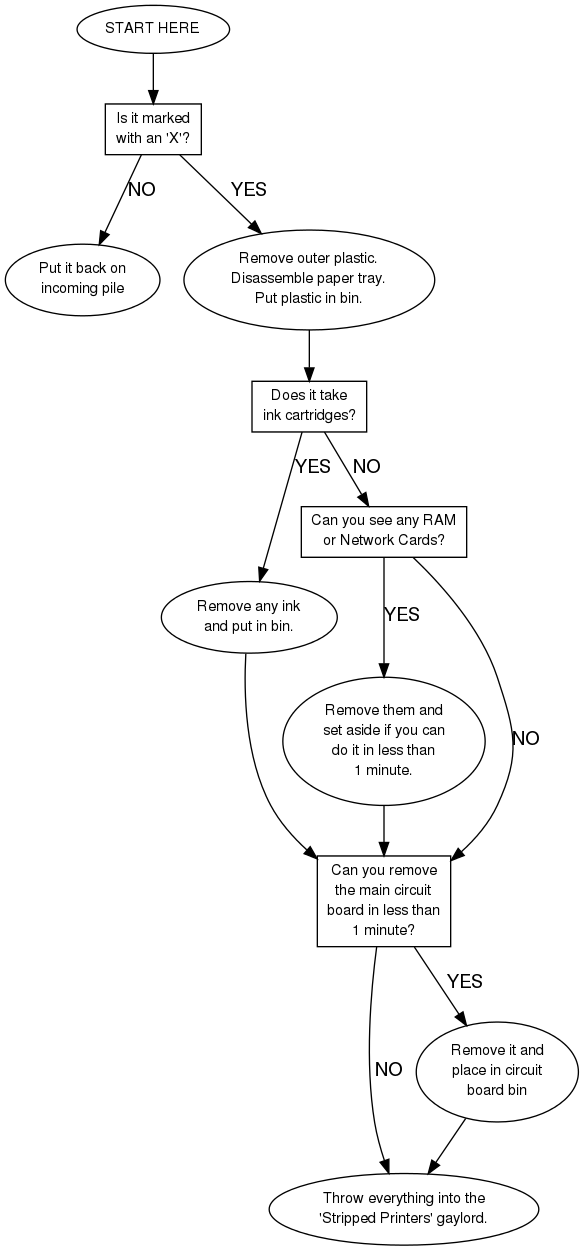
| − | + | start [label="START HERE"] | |
| − | + | with_x [label="Is it marked\nwith an 'X'?", shape="box"] | |
| + | no_x [label="Put it back on\nincoming pile"] | ||
| + | yes_x [label="Remove outer plastic.\nDisassemble paper tray.\nPut plastic in bin."] | ||
| + | ink [label="Does it take\nink cartridges?", shape="box"] | ||
| + | yes_ink [label="Remove any ink\nand put in bin."] | ||
| + | no_ink [label="Can you see any RAM\nor Network Cards?", shape="box"] | ||
| + | yes_extras [label="Remove them and\nset aside if you can\ndo it in less than\n1 minute."] | ||
| + | circuit_board [label="Can you remove\nthe main circuit\nboard in less than\n1 minute?", shape="box"] | ||
| + | stripped [label="Throw everything into the\n'Stripped Printers' gaylord."] | ||
| + | remove_board [label="Remove it and\nplace in circuit\nboard bin"] | ||
| + | |||
| + | start -> with_x | ||
| + | with_x -> yes_x [label="YES"] | ||
| + | with_x -> no_x [label="NO"] | ||
| + | yes_x -> ink | ||
| + | ink -> yes_ink [label="YES"] | ||
| + | ink -> no_ink [label="NO"] | ||
| + | yes_ink -> circuit_board | ||
| + | no_ink -> yes_extras [label="YES"] | ||
| + | no_ink -> circuit_board [label="NO"] | ||
| + | yes_extras -> circuit_board | ||
| + | circuit_board -> remove_board [label="YES"] | ||
| + | circuit_board -> stripped [label="NO"] | ||
| + | remove_board -> stripped | ||
| + | } | ||
| + | </graphviz> | ||
| + | |||
| + | *tear down | ||
| + | *vacuum dust | ||
| + | *inspect | ||
| + | *clean rollers | ||
| + | *reassemble | ||
| + | *print test page from printer | ||
| + | *print test from Ubuntu on parallel/serial/USB/network | ||
| + | *run a 20 page paper path test | ||
| + | |||
| + | [[Printer Parting 1]] | ||
cold/factory reset | cold/factory reset | ||
| Line 24: | Line 60: | ||
HP/Cannon/Epson/Lexmark/Okidata/Apple | HP/Cannon/Epson/Lexmark/Okidata/Apple | ||
| − | http://www.tonsoftoner.com/ | + | http://www.tonsoftoner.com/ |
| − | http://www.inksell.com/ | + | |
| − | http://www.fixyourownprinter.com/[ | + | http://www.inksell.com/ |
| + | |||
| + | http://www.fixyourownprinter.com/ | ||
| + | |||
| + | [[Category: Printers]] | ||
Latest revision as of 16:31, 6 July 2010
Note: this page is currently under construction and thus shouldn't be linked to from the main printer pages yet. Darin
Laser Printer Build:
- tear down
- vacuum dust
- inspect
- clean rollers
- reassemble
- print test page from printer
- print test from Ubuntu on parallel/serial/USB/network
- run a 20 page paper path test
cold/factory reset leave on for 20min with new fuser front/rear paper feed trays paper path pickup roller/seperator tab rubber restore, sandpaper? springs in paper tray missing/broken tabs in paper tray
HP/Cannon/Epson/Lexmark/Okidata/Apple