Difference between revisions of "Spanish Build Documents"
Jump to navigation
Jump to search
| Line 27: | Line 27: | ||
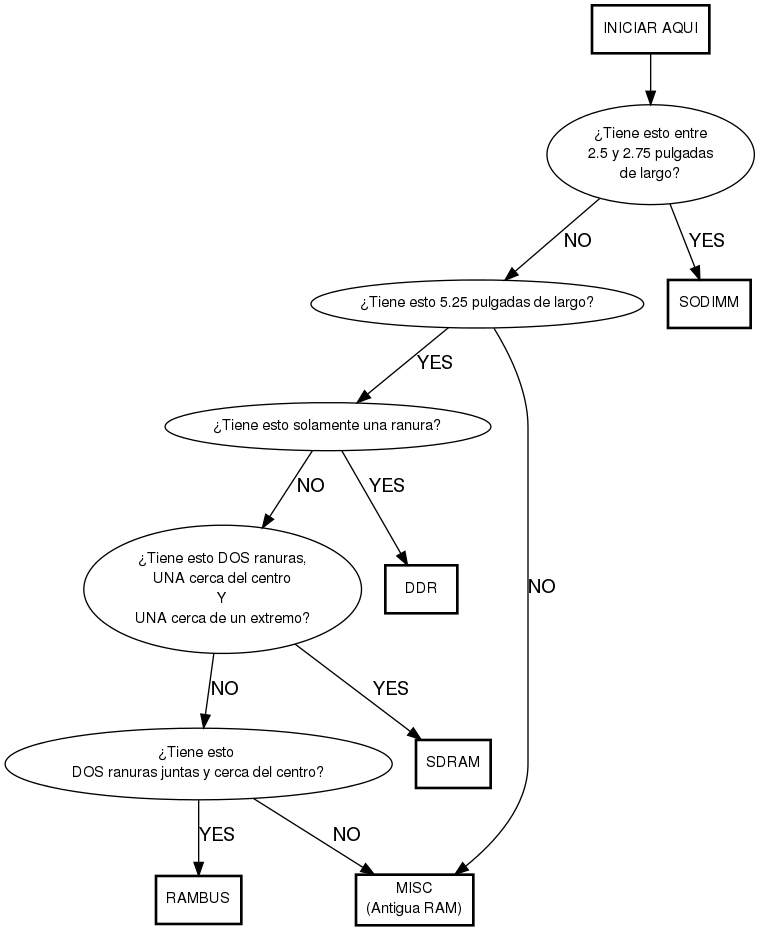
short -> long [label="NO"] | short -> long [label="NO"] | ||
| − | short -> sodimm [label=" | + | short -> sodimm [label="SI"] |
| − | long -> multinotch [label=" | + | long -> multinotch [label="SI"] |
long -> misc [label="NO"] | long -> misc [label="NO"] | ||
| − | multinotch -> ddr [label=" | + | multinotch -> ddr [label="SI"] |
multinotch -> endnotch [label="NO"] | multinotch -> endnotch [label="NO"] | ||
| − | endnotch -> sdram [label=" | + | endnotch -> sdram [label="SI"] |
endnotch -> closenotch [label="NO"] | endnotch -> closenotch [label="NO"] | ||
| − | closenotch -> rambus [label=" | + | closenotch -> rambus [label="SI"] |
closenotch -> misc [label="NO"] | closenotch -> misc [label="NO"] | ||
| Line 91: | Line 91: | ||
recycle_label -> rejected [label="NO"] | recycle_label -> rejected [label="NO"] | ||
| − | recycle_label -> circled [label=" | + | recycle_label -> circled [label="SI"] |
rejected -> hold_label [label="NO"] | rejected -> hold_label [label="NO"] | ||
| − | rejected -> yellow [label=" | + | rejected -> yellow [label="SI"] |
circled -> initial [label="RED or\nYELLOW\nCIRCLED"] | circled -> initial [label="RED or\nYELLOW\nCIRCLED"] | ||
circled -> exceptional [label="NOTHING\nCIRCLED"] | circled -> exceptional [label="NOTHING\nCIRCLED"] | ||
| − | hold_label -> check_in [label=" | + | hold_label -> check_in [label="SI"] |
hold_label -> rack_mount [label="NO"] | hold_label -> rack_mount [label="NO"] | ||
| − | rack_mount -> check_in [label=" | + | rack_mount -> check_in [label="SI"] |
rack_mount -> computer [label="NO"] | rack_mount -> computer [label="NO"] | ||
| − | exceptional -> yellow [taillabel=" | + | exceptional -> yellow [taillabel="SI"] |
exceptional -> red [taillabel="NO", color="red"] | exceptional -> red [taillabel="NO", color="red"] | ||
| Line 115: | Line 115: | ||
computer -> askwhere [label="NO"] | computer -> askwhere [label="NO"] | ||
| − | computer -> mac [taillabel=" | + | computer -> mac [taillabel="SI"] |
mac -> incompatible [taillabel="NO"] | mac -> incompatible [taillabel="NO"] | ||
| − | mac -> mac_chart [taillabel=" | + | mac -> mac_chart [taillabel="SI"] |
| − | incompatible -> askwhere [taillabel=" | + | incompatible -> askwhere [taillabel="SI"] |
incompatible -> vaccuum [taillabel="NO"] | incompatible -> vaccuum [taillabel="NO"] | ||
vaccuum -> visual | vaccuum -> visual | ||
| Line 126: | Line 126: | ||
visual -> whichway | visual -> whichway | ||
| − | whichway -> exceptional [label=" | + | whichway -> exceptional [label="SI"] |
whichway -> trytopost [taillabel="NO"] | whichway -> trytopost [taillabel="NO"] | ||
Revision as of 20:45, 7 July 2010
This page has all the translations for the Spanish Build Program (charts, checklists, instructions, information...)
- Box A
- RAM Sorting
System Evaluation Overview
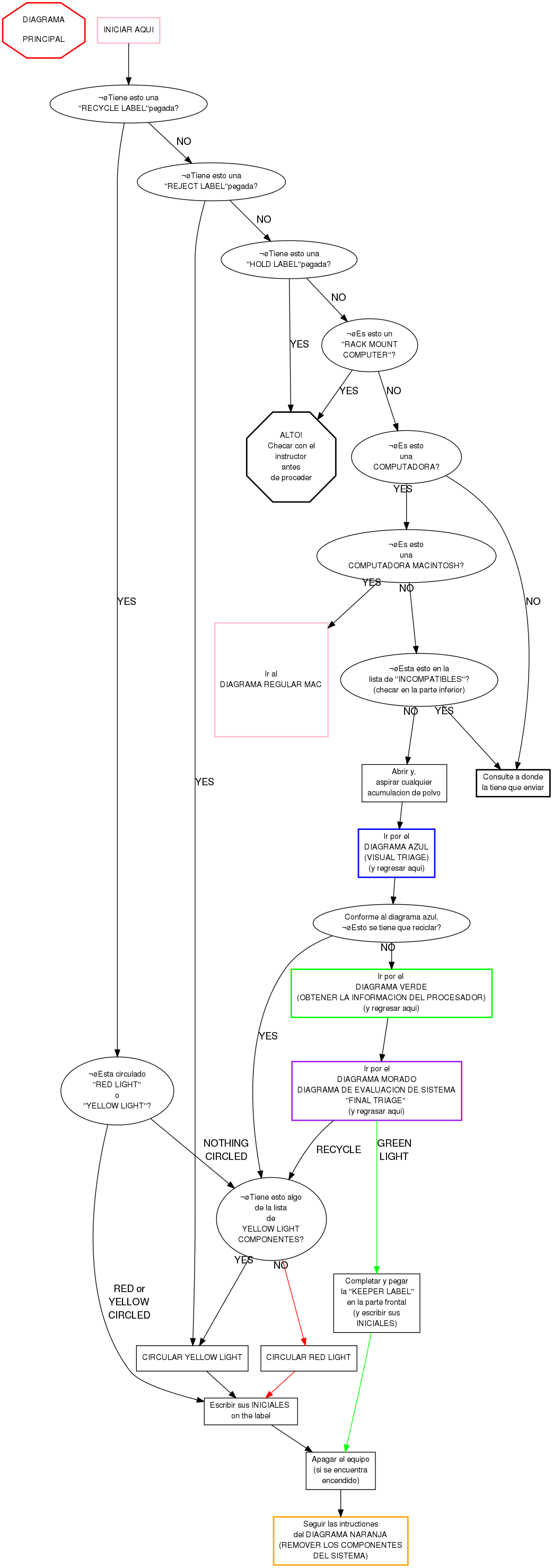
DIAGRAMA PRINCIPAL
Como completar la "KEEPER LABEL"
- Contar el numero de DDR slots y circular el numero correcto.
- Para AMD chips:
- Circular AMD en la seccion de "Proc Type"
- Escribir del procesador numero de modelo en el are de "Processor Information"
- Para Intel y otro tipo de chips:
- Circule el tipo de procesador (o escriba "Other")
- Escriba la speed del procesador en el area "Processor Information"
- Si la tarjeta madre tiene conectores SATA circule el numero de conectores
- Si la tarjeta madre tiene conectores IDE circule el numero de conectores
- Si el sistema tiene mas de un processor slot, marque la caja de Multi Proc Capable
- Si el sistema tiene un procesador dual core , marque la caja de Dual Core
- Si el sistema no mostro la informacion exitosamente, marque la caja deDid not POST
- Si se encuentran PCIe slots, circule PCI-e
- Si se encuentran AGP slot, circule AGP
- Recuerde escribir sus iniciales en la caja correspondiente
Incompatibles
NOTA: Si el sistema no tiene marca, entonces no se encuentra en la lista de incompatibles.
- Amiga
- Apple, etc:
- Mac
- Radius
- PowerPC
- PowerComputing
- Umax Supermac
- Commodore
- DEC (Digital Equipment Corporation)
- Sun
- Silicon Graphics (SGI)
- Indy (they're blue)
- anything with the label RISC on it
- High Speed or Ultra Speed CD RW
- They must have a standard 5.25" rectangular faceplate and not be laptop-sized.
- A drive is only High Speed or Ultra Speed if it literally says "High Speed" or "Ultra Speed" to the right of the "Compact Disc" label.

- DVD Drive
- They must have a standard 5.25" rectangular faceplate and not be laptop-sized.
- Front side card readers, only if it includes a cable
- Gigabit ethernet card (Network Card marked 1000)
- Wireless card
- Power supply with a SATA connector
- Molex to SATA power supply adapter
- Molex to 6-pin power supply adapter
- Motherboard with SATA connector(s)
- A really cool case that some geeky kid would drool over