Difference between revisions of "Getting the Processor Information"
Jump to navigation
Jump to search
| Line 25: | Line 25: | ||
swapvideocard [label="Swap out the VIDEO CARD\nDoes it power on?"] | swapvideocard [label="Swap out the VIDEO CARD\nDoes it power on?"] | ||
goback [label="Go back to the\nSYSTEM EVALUATION 2 OVERVIEW chart", shape="box", style="bold", URL="/index.php/System_Evaluation_2_Overview"] | goback [label="Go back to the\nSYSTEM EVALUATION 2 OVERVIEW chart", shape="box", style="bold", URL="/index.php/System_Evaluation_2_Overview"] | ||
| − | testpower [label=" | + | testpower [label="Does the\nPOWER SUPPLY\nwork?\n(Test it)"] |
start -> proc | start -> proc | ||
Revision as of 16:45, 29 May 2007
The process
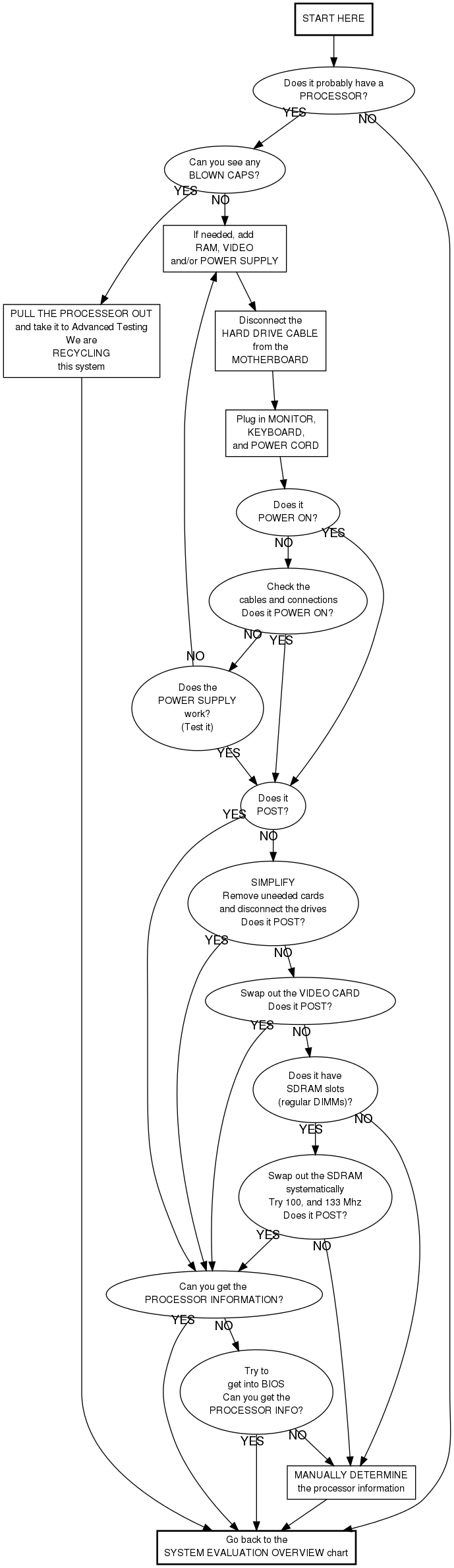
Checking the Cables and Connections
- Is the power strip on?
- Is the computer plugged into the power strip?
- Is the power switch on the back of the power supply on?
- Is the power supply plugged into the motherboard?
- Is the power switch connected to the motherboard?
Manually determining the processor information
This is your last resort option. Do not do this unless the instructions told you to.
- See if you can see the speed without removing anything
- Remove the heat sink/fan only if necessary
- See the Note on Processor Speeds below.