Difference between revisions of "Power Supply Triage"
Jump to navigation
Jump to search
| Line 1: | Line 1: | ||
| + | __NOTOC__ | ||
| + | Power supply sorting is done in [[System Evaluation]]. | ||
| + | |||
| + | == Sort == | ||
| + | Create a temporary place for two piles: | ||
| + | * Keep | ||
| + | * Recycle | ||
| + | Follow the triage flow chart below to determine which pile to put the power supply in. You will need to test some power supplies to do this. | ||
| + | |||
| + | ==Chart== | ||
<graphviz> | <graphviz> | ||
| − | + | digraph POWERSUPPLYTRIAGE { | |
| − | + | node [fontname="Helvetica", fontsize="11"] | |
| − | + | edge [fontname="Helvetica"] | |
| − | |||
| − | |||
| − | |||
| − | |||
| − | |||
| − | |||
| − | |||
| − | |||
| − | start | + | at [label="Is it an AT?\n(not an ATX)"] |
| − | + | start [label="START HERE", shape="box", style="bold"] | |
| − | + | blackcord [label="Does it have a thick black cord?"] | |
| + | shape [label="Is it the same shape and size\n as the power supply marked 'EXAMPLE'?\nLittle metal rails don't count as different;\nexternal fans do."] | ||
| + | compaq [label="Does it say 'COMPAQ' on its label?"] | ||
| + | broken [label="Is it broken?\nDoes it have clipped cords or an open case?\nDid somebody write 'BAD' on it?"] | ||
| + | recycle [label="RECYCLE\nClip all cords. Separate cords into thick and thin wire bins.\nPut the power supply in the 'RECYCLE' bin on the cart." shape="box", style="bold"] | ||
| + | test [label="TEST IT\nDoes it work?"] | ||
| + | keep [label="KEEP\nPut the power supply in one of the 'KEEP' bins on the cart." shape="box", style="bold"] | ||
| − | + | start -> at | |
| − | + | at -> recycle [label="YES"] | |
| + | at -> blackcord [label="NO"] | ||
| + | blackcord -> recycle [taillabel="YES"] | ||
| + | blackcord -> shape [label="NO"] | ||
| − | + | shape -> broken [label="YES"] | |
| − | + | shape -> recycle [taillabel="NO"] | |
| − | + | broken -> recycle [taillabel="YES"] | |
| − | + | broken -> compaq [label="NO"] | |
| + | compaq -> recycle [label="YES"] | ||
| + | compaq -> test | ||
| + | test -> recycle [label="NO"] | ||
| + | test -> keep [label="YES"] | ||
} | } | ||
</graphviz> | </graphviz> | ||
| + | |||
| + | == Test == | ||
| + | * Get the ATX power supply tester from a Build Coordinator (Dave or Martin), or ask any staff member. You can also check and see if the store has one. If you can't find a tester...move on to a different project, one will turn up eventually. | ||
| + | * For each power supply that needs to be tested, do these things: | ||
| + | *# Plus each power supply into outlet | ||
| + | *# Connect the tester to the ATX connector | ||
| + | *# Check lights (solid lights are good) | ||
| + | *# Put failures in Recycle pile (as directed in the Triage chart) | ||
| + | * When finished, give the power supply tester back to Build Coordinator | ||
| + | |||
| + | == Receiving == | ||
| + | * Count how many power supplies you have that are heading to the Thrift Store. | ||
| + | * As a receiver, clone that many ATX power supplies | ||
| + | * Write out labels and affix to the good power supplies | ||
| + | |||
| + | == Where to put them == | ||
| + | * Power supplies in your Recycle pile go straight to Recycling after they are signed off by the Eval instructor. There is no need to receive or label them. | ||
| + | |||
| + | ; Thrift Store | ||
| + | : Give them to whoever is on duty behind the counter at the Thrift Store. | ||
| + | ; Wholesale Shelf | ||
| + | : The wholesale shelf is in the warehouse immediately on the right as you enter from the testing and evaluation areas. (The first two shelf bays.) | ||
| + | ; Recycle | ||
| + | : Take these to the recycling area in the warehouse and ask the recyclers where they want them. | ||
| + | |||
| + | [[Category: Prebuild]] | ||
Revision as of 13:01, 11 March 2008
Power supply sorting is done in System Evaluation.
Sort
Create a temporary place for two piles:
- Keep
- Recycle
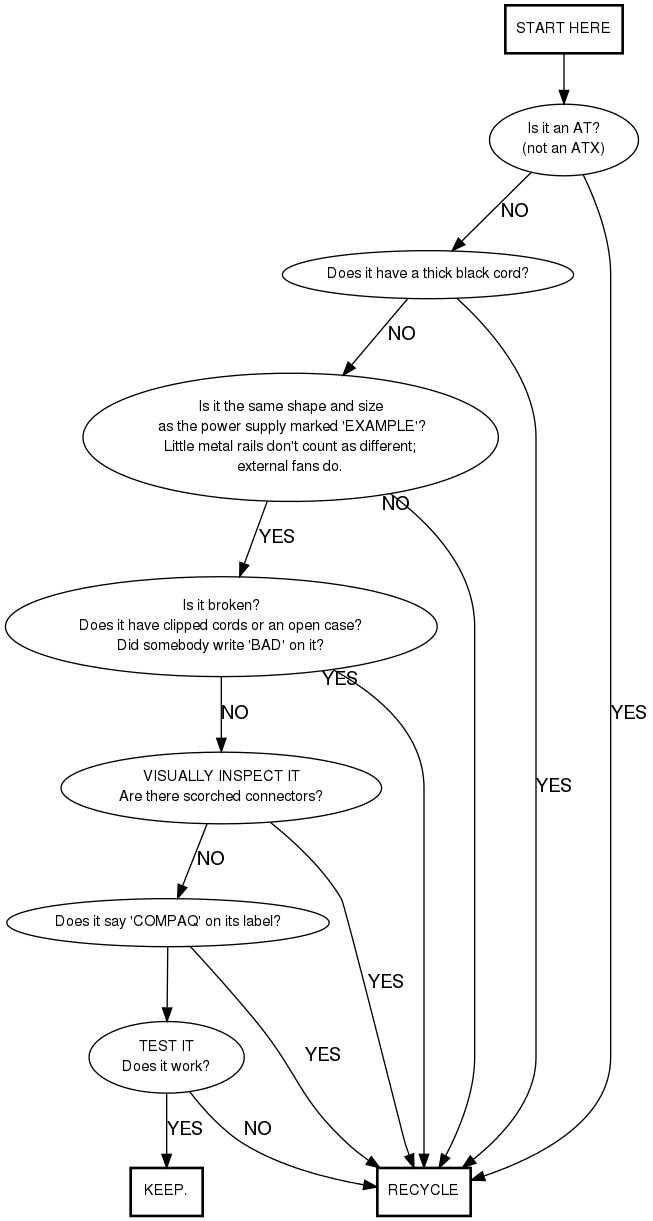
Follow the triage flow chart below to determine which pile to put the power supply in. You will need to test some power supplies to do this.
Chart
Test
- Get the ATX power supply tester from a Build Coordinator (Dave or Martin), or ask any staff member. You can also check and see if the store has one. If you can't find a tester...move on to a different project, one will turn up eventually.
- For each power supply that needs to be tested, do these things:
- Plus each power supply into outlet
- Connect the tester to the ATX connector
- Check lights (solid lights are good)
- Put failures in Recycle pile (as directed in the Triage chart)
- When finished, give the power supply tester back to Build Coordinator
Receiving
- Count how many power supplies you have that are heading to the Thrift Store.
- As a receiver, clone that many ATX power supplies
- Write out labels and affix to the good power supplies
Where to put them
- Power supplies in your Recycle pile go straight to Recycling after they are signed off by the Eval instructor. There is no need to receive or label them.
- Thrift Store
- Give them to whoever is on duty behind the counter at the Thrift Store.
- Wholesale Shelf
- The wholesale shelf is in the warehouse immediately on the right as you enter from the testing and evaluation areas. (The first two shelf bays.)
- Recycle
- Take these to the recycling area in the warehouse and ask the recyclers where they want them.