Difference between revisions of "Getting the Processor Information en Español"
Jump to navigation
Jump to search
(→GREEN Chart: sync with english) |
m (→GREEN Chart) |
||
| Line 11: | Line 11: | ||
shape="box"] | shape="box"] | ||
bios [label="Try to\nget into BIOS\nCan you get the\nPROCESSOR INFO?", | bios [label="Try to\nget into BIOS\nCan you get the\nPROCESSOR INFO?", | ||
| − | label="Intente\naccesar a BIOS\n¿Puede usted obtener\nla información | + | label="Intente\naccesar a BIOS\n¿Puede usted obtener\nla información \ndel \nPROCESSOR ?"] |
blowncaps [label="Can you see any\nBLOWN CAPS?", | blowncaps [label="Can you see any\nBLOWN CAPS?", | ||
| − | label="¿Puede ver un\ntransistor | + | label="¿Puede ver un\ntransistor \nquemado \no \ndefectuoso?"] |
checkconnect [label="Check the\ncables and connections\n(see note below).\nDoes it POWER ON?", | checkconnect [label="Check the\ncables and connections\n(see note below).\nDoes it POWER ON?", | ||
label="Verifique los\ncables y conecciones\n(Véase nota abajo)\n¿El SISTEMA ENCIENDE?"] | label="Verifique los\ncables y conecciones\n(Véase nota abajo)\n¿El SISTEMA ENCIENDE?"] | ||
checktight [label="Check to make sure\nall cards and memory sticks are\nproperly seated", | checktight [label="Check to make sure\nall cards and memory sticks are\nproperly seated", | ||
| − | label="Verifique cuidadosamente que\ntodas las tarjetas | + | label="Verifique cuidadosamente que\ntodas las tarjetas \ny memorias \nestén\ncorrectamente instaladas", |
shape="box"] | shape="box"] | ||
disconnect [label="Disconnect the\nHARD DRIVE CABLE\nfrom the\nMOTHERBOARD", | disconnect [label="Disconnect the\nHARD DRIVE CABLE\nfrom the\nMOTHERBOARD", | ||
| Line 26: | Line 26: | ||
shape="box", style="dashed", color="red", URL="/index.php/System_Evaluation_Overview"] | shape="box", style="dashed", color="red", URL="/index.php/System_Evaluation_Overview"] | ||
manualdetermine [label="Check in with instructor!\nUse an\nALTERNATIVE METHOD\nto determine the proc info", | manualdetermine [label="Check in with instructor!\nUse an\nALTERNATIVE METHOD\nto determine the proc info", | ||
| − | label="Use un\nMETODO | + | label="Use un\nMETODO \nALTERNATIVO\npara obtener la INFO \ndel PROCESADOR", |
URL="/index.php/System_Evaluation_Overview", shape="box"] | URL="/index.php/System_Evaluation_Overview", shape="box"] | ||
plugin [label="Plug in MONITOR,\nKEYBOARD,\nand POWER CORD", | plugin [label="Plug in MONITOR,\nKEYBOARD,\nand POWER CORD", | ||
| Line 38: | Line 38: | ||
label="¿El sistema tiene un\nPROCESADOR?"] | label="¿El sistema tiene un\nPROCESADOR?"] | ||
heatsink_fan [label="Does it have a\n HEAT SINK and/or FAN?", | heatsink_fan [label="Does it have a\n HEAT SINK and/or FAN?", | ||
| − | label="¿El sistema | + | label="¿El sistema \ntiene un\nCALENTADOR \ny/o \nVENTILADOR?"] |
procinfo [label="Can you get the \nPROCESSOR INFORMATION?", | procinfo [label="Can you get the \nPROCESSOR INFORMATION?", | ||
| − | label="¿Puede usted | + | label="¿Puede usted \nobtener la\nINFORMACIÓN \nDEL \nPROCESADOR?"] |
pull_mobo [label="PULL THE MOTHERBOARD OUT\nand take it to Advanced Testing\nWe are\nRECYCLING\nthis system", | pull_mobo [label="PULL THE MOTHERBOARD OUT\nand take it to Advanced Testing\nWe are\nRECYCLING\nthis system", | ||
| − | label="REMUEVA LA | + | label="REMUEVA LA \nTARJETA MADRE\ny llévela a \nAdvanced Testing\nNosotros\nRECICLAMOS\neste gabinete", |
shape="box"] | shape="box"] | ||
simplify [label="SIMPLIFY\nRemove uneeded cards\nand disconnect the drives\nDoes it POST?", | simplify [label="SIMPLIFY\nRemove uneeded cards\nand disconnect the drives\nDoes it POST?", | ||
| − | label="Remueva las | + | label="Remueva las \ntarjetas innecesarias\ny desconecte los \nlectores y disco duro.\nDespliega alguna \nINFORMACIÓN?"] |
start [label="START HERE", | start [label="START HERE", | ||
label="INICIAR AQUI", | label="INICIAR AQUI", | ||
shape="box", style="bold", color="green"] | shape="box", style="bold", color="green"] | ||
swapram [label="Try a different\nstick of RAM\nDoes it POST?", | swapram [label="Try a different\nstick of RAM\nDoes it POST?", | ||
| − | label="Pruebe una diferente\ntarjeta de memoria\n¿Despliega alguna | + | label="Pruebe una diferente\ntarjeta de memoria\n¿Despliega alguna \nINFORMACIÓN?"] |
swapvideocard [label="Swap out the VIDEO CARD\nDoes it POST?", | swapvideocard [label="Swap out the VIDEO CARD\nDoes it POST?", | ||
| − | label="Cambie la tarjeta de VIDEO\n¿Despliega alguna | + | label="Cambie la tarjeta de VIDEO\n¿Despliega alguna \nINFORMACIÓN?"] |
testpower [label="Does the\nPOWER SUPPLY\nwork?\n(Test it)", | testpower [label="Does the\nPOWER SUPPLY\nwork?\n(Test it)", | ||
label="¿Está funcionando\nla\nfuente de poder?\n(Pruebelo)"] | label="¿Está funcionando\nla\nfuente de poder?\n(Pruebelo)"] | ||
Latest revision as of 14:39, 10 September 2011
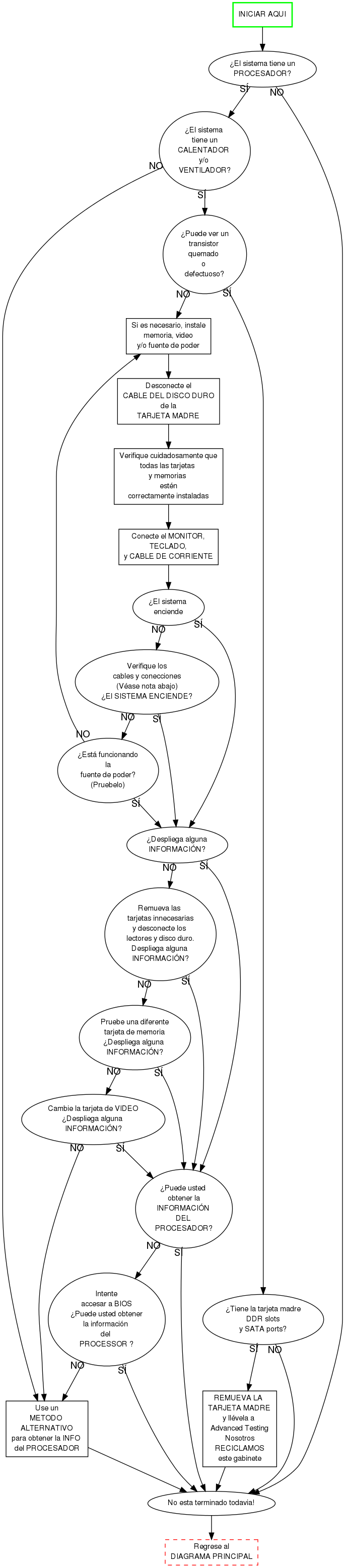
GREEN Chart
Chequeo de los Cables y Conecciones
- ¿Está encendido el multiconector?
- ¿Está la computadora conectada al multiconector?
- ¿Está encendido el interruptor en la parte trasera de la fuente de poder?
- ¿La fuente de poder está conectado dentro de la tarjeta madre?
- Algunas tarjetas madres tiene un 4 pin conector (además de el 20 o 24 pin conector). Si es así, además enchufe este 4 pin conector.
- ¿Está el botón de encender conectado a la tarjeta madre?
Metodo Alternativo para obtener la INFORMACIÓN del PROCESADOR
Esta es la última opción. No haga esto a menos que el intructor lo ordene.
- ¿Esta en la computadora el numero del modelo o la velocidad?
- Use esta información. (Quizás necesita usted a googlear el numero de modelo.)
- Si (y solo si) usted no puede encontrar alguna marca o etiqueta con el modelo o la velocidad:
- Consulta con un instructor
- ¿Usted puede ver la velocidad del procesador sin remover nada?
- Remueva el disipador de calor/ventilador solo si es necesario
- Puede ser que necesita una lupa. (Pregunte al instructor.)
English Version: Getting_the_Processor_Information
Vercion Español: Getting_the_Processor_Information_en_Español