Difference between revisions of "Cell Phone Testing"
Jump to navigation
Jump to search
Jared.kimber (talk | contribs) |
|||
| (15 intermediate revisions by 8 users not shown) | |||
| Line 1: | Line 1: | ||
| − | = | + | {{migrated}} |
| + | [https://docs.google.com/a/freegeek.org/document/d/1NEEBAGkkh0jlhyu9S6Q0jn_e9dbJ4ymnE-b1iMfta6s/edit?usp=sharing Link] | ||
| − | [[ | + | = Cell Phone Testing = |
| + | [[User:Elizabeth|Elizabeth]] 18:28, 12 January 2011 (UTC) | ||
| + | Currently limited cell phone testing is being done by a Production Intern and is no longer a task under the purview of Advanced Testing. | ||
| + | |||
| + | == Cell Phone Makes == | ||
| + | [[Samsung]], [[Motorola]], [[LG]], [[Nokia]], [[BlackBerry]], [[Other]], [[Other2]] | ||
| + | |||
| + | NOTE!: | ||
| + | Because this is all a work in progress we need as much help as possible, if you learn if a particular model of | ||
| + | phone does/n't use a master reset or if you find any other useful information please add it to discussion on this | ||
| + | page, or on the particular make page, or write a note and leave it in the little yellow testing box. | ||
| + | |||
| + | == Cell Phone Testing Flow Chart == | ||
| + | |||
| + | <graphviz> | ||
| + | digraph Cell_Phone_Chart { | ||
| + | |||
| + | # size="7,10" | ||
| + | |||
| + | node [fontname="Helvetica", fontsize="11"] | ||
| + | edge [fontname="Helvetica"] | ||
| + | |||
| + | start [label="START HERE", fontsize="11", shape="box", style="bold"] | ||
| + | busted [label="Is the phone visibly broken?", fontsize="11"] | ||
| + | recycle [label="Recycle it" fontsize="11", shape="box", style="bold"] | ||
| + | recycle2 [label="Remove battery.", shape="box", fontsize="11", style="bold"] | ||
| + | charger [label="Match it with a charger", fontsize="11"] | ||
| + | charging [label="Does it charge when you plug it in?", fontsize="11"] | ||
| + | battery [label="Try up to 3 batteries. Does it charge?", fontsize="11", shape="box"] | ||
| + | sim [label="Unplug it and replace the SIM card with blank testing SIM\n(note: Verizon does not usually take SIM cards, move on)", fontsize="11"] | ||
| + | poweron [label="Turn the phone on", fontsize="11"] | ||
| + | reset [label="Can you find a master reset and master clear option?\n(Usually in the Settings/Tools Folder)", fontsize="11"] | ||
| + | instr [label="Look on the wiki for instructions.\nCheck the Nokia, LG, Samsung or Motorola page.\n Did you find a clear option?" fontsize="11"] | ||
| + | google [label="Google it!\nNo luck? Ask your instructor", fontsize="11", shape="box", style="bold"] | ||
| + | check [label="Do it!\nNote: Passwords to most phones are either, 0000, 000000, 1234, or 123456\nCheck to make sure all data is erased from:\ncall log, messages, address book, calendar, and photos.\n Is the data errased?" fontsize="11"] | ||
| + | buttons [label="Test all buttons.\nDo they all work?" fontsize="11"] | ||
| + | camera [label="Test camera.\nDoes it work?" fontsize="11"] | ||
| + | remove [label="Remove the testing SIM\nif applicable", fontsize="11"] | ||
| + | sticker [label="Fill out 'Tested By' sticker" fontsize="11"] | ||
| + | store [label="Put phone in Store Box with charger" fontsize="11", shape="box"] | ||
| + | |||
| + | |||
| + | start -> busted | ||
| + | busted -> recycle [label="YES"] | ||
| + | busted -> charger [label="NO"] | ||
| + | charger -> charging | ||
| + | charging -> battery [label="NO"] | ||
| + | battery -> recycle [label="NO"] | ||
| + | charging -> sim [label="YES"] | ||
| + | battery -> sim [label="YES"] | ||
| + | sim -> poweron | ||
| + | poweron -> buttons | ||
| + | buttons -> camera [label="YES"] | ||
| + | buttons -> recycle2 [label="NO"] | ||
| + | camera -> reset [label="YES"] | ||
| + | camera -> recycle2 [label="NO"] | ||
| + | reset -> instr [label="NO"] | ||
| + | instr -> google [label="NO"] | ||
| + | instr -> check [label="YES"] | ||
| + | reset -> check [label="YES"] | ||
| + | check -> remove [label="YES"] | ||
| + | check -> google [label="NO"] | ||
| + | remove -> sticker | ||
| + | sticker -> store | ||
| + | recycle2 -> recycle | ||
| + | |||
| + | } | ||
| + | </graphviz> | ||
| + | |||
| + | [[Category:Hardware Testing]] | ||
| + | [[Category:Howto]] | ||
Latest revision as of 15:15, 4 April 2014
 This page has been migrated to a document on Free Geek's Google Drive. Information remaining behind may no longer be relevant. MIGRATOR: When you have tagged this page as migrated, (Link to new page immediately below.) |
Cell Phone Testing
Elizabeth 18:28, 12 January 2011 (UTC) Currently limited cell phone testing is being done by a Production Intern and is no longer a task under the purview of Advanced Testing.
Cell Phone Makes
Samsung, Motorola, LG, Nokia, BlackBerry, Other, Other2
NOTE!:
Because this is all a work in progress we need as much help as possible, if you learn if a particular model of
phone does/n't use a master reset or if you find any other useful information please add it to discussion on this
page, or on the particular make page, or write a note and leave it in the little yellow testing box.
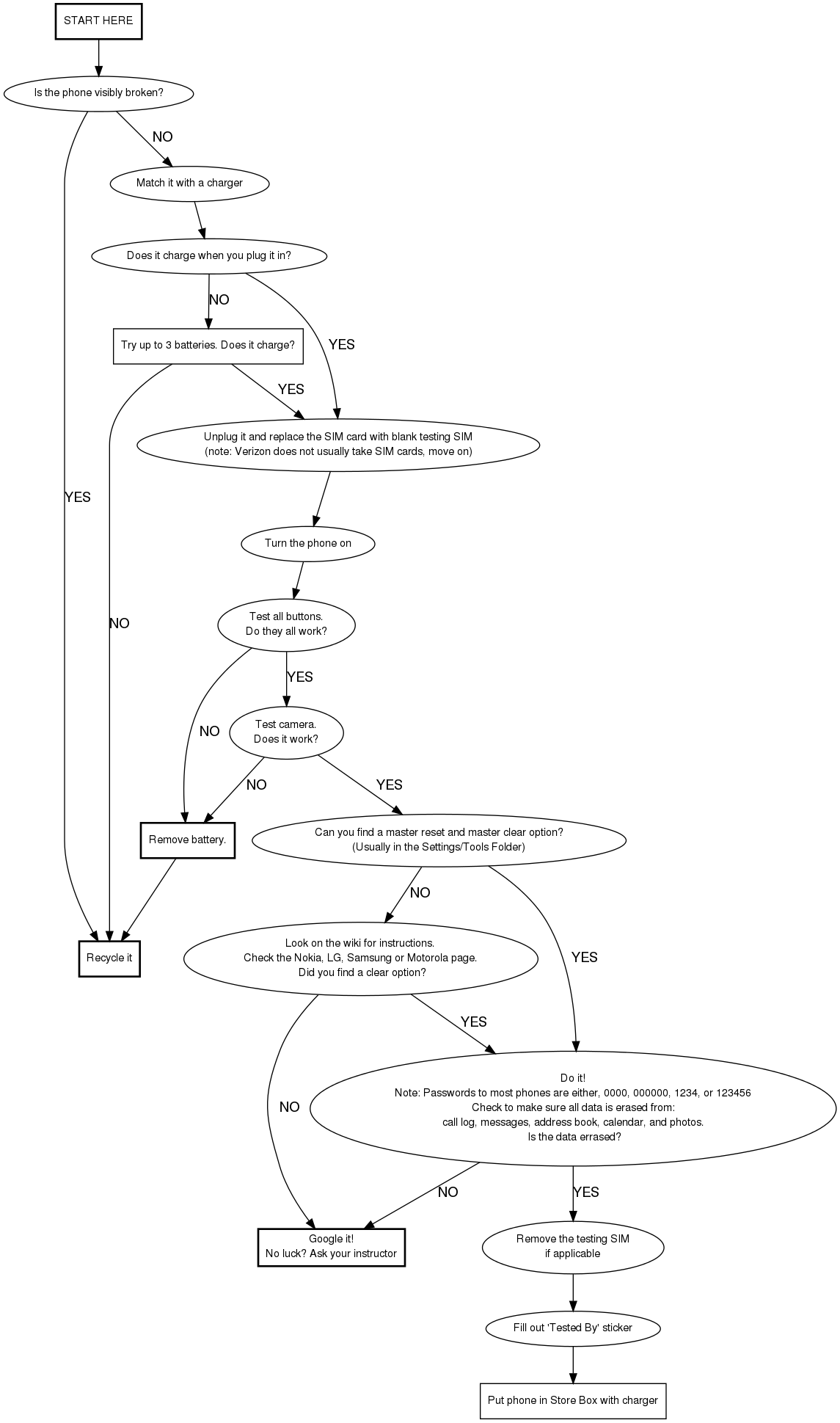
Cell Phone Testing Flow Chart